How to Improve Email Deliverability in 2026
Learn how to improve email deliverability with proven fixes for SPF, DKIM, DMARC, warm-up, list hygiene, and inbox placement monitoring that actually work.
Fully authenticated domains can reach about 89.1% inbox placement, while domains without full DMARC authentication fall to 44.2%, a 45-percentage-point gap according to independent 2026 deliverability benchmarking. That difference reframes how to improve email deliverability in 2026. Authentication isn't a technical checkbox beneath the “real” work of copywriting. It is one of the strongest levers controlling whether a B2B message reaches a human, lands in spam, or gets rejected.
I've worked on outbound systems for global and APAC-focused teams, and the same failure appears repeatedly. Teams polish sequences, buy better data, and adjust send times while their domains remain partially authenticated, their suppression rules are disconnected, and their Gmail placement is materially worse than their blended dashboard suggests. Deliverability is a system, not a campaign setting.
Table of Contents
What Email Deliverability Means in 2026
Email delivery means the receiving server accepted the message. Email deliverability measures what happened after that decision. Did the message reach the primary inbox, enter spam, land in another tab, or get blocked by a policy filter? Acceptance can look healthy in a CRM while a campaign receives little visible attention.
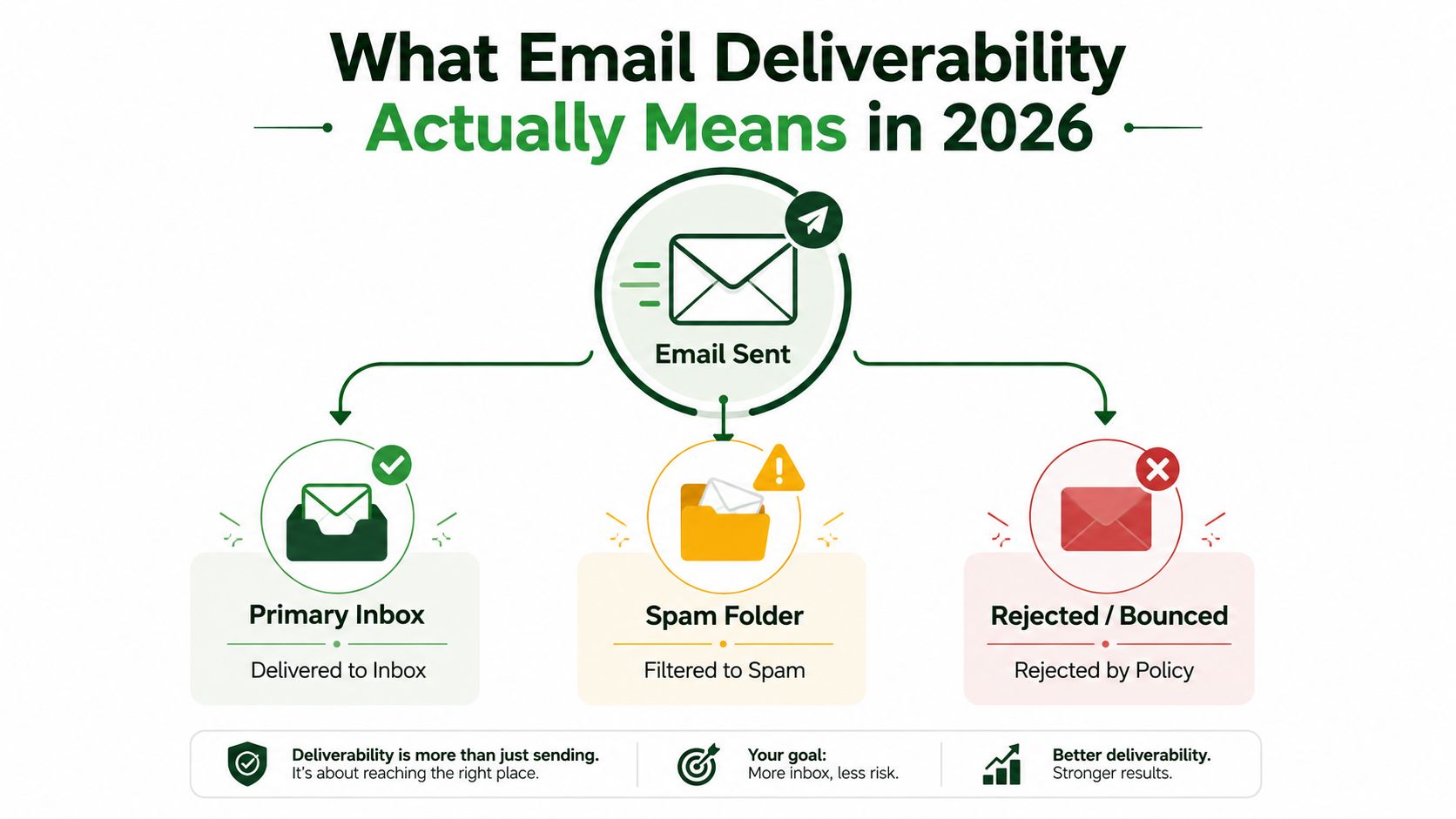
A practical definition is predictable inbox placement earned through trusted infrastructure and wanted recipient behavior. Authentication, sender and domain reputation, list quality, content, cadence, engagement, and mailbox-provider policy all affect that outcome. Gmail, Yahoo, Microsoft, and APAC providers apply different filters, so a global average can hide a serious regional failure.
Establish a baseline before changing campaigns. Measure these signals by provider and audience region:
Inbox placement: Use seeded inboxes and provider-level tests, not delivery acceptance alone.
Hard and soft bounces: Separate permanent address failures from temporary deferrals.
Spam complaints and unsubscribes: Treat both as audience-fit and reputation signals.
Unknown-user events: These expose stale or malformed data.
Replies and meaningful engagement: A reply is more useful operationally than a superficial open.
Open rates: Interpret them cautiously because Apple privacy features and security scanners can distort them.
Industry benchmark guidance commonly treats 90–95% or higher inbox placement as healthy, with complaints below roughly 0.1% and bounces below 2% as safer operating boundaries. These reference points come from 2026 deliverability benchmark guidance, not universal guarantees. Gmail-heavy prospecting and APAC-heavy audiences may require separate baselines.
Practical rule: Diagnose placement by mailbox provider before rewriting the email. A blended dashboard shows that performance changed, but not where the failure began.
Teams targeting Australian recipients can use this resource on how to boost inbox placement in Australia to shape regional testing. Australian performance should be measured directly, rather than treated as a footnote to global deliverability.
Setting Up SPF, DKIM, and DMARC the Right Way
SPF, DKIM, and DMARC form a layered trust stack. SPF identifies which sending services are authorized for a domain. DKIM adds a cryptographic signature that receiving systems can validate. DMARC connects those checks to the visible From domain and tells the receiving server how to handle failures.
Partial setup is where many outbound programs go wrong. A domain can have an SPF record and still fail DKIM alignment. It can have DKIM and still publish DMARC without enforcing a meaningful policy. The result looks authenticated in a vendor dashboard but remains ambiguous to the mailbox provider.
The performance gap is too large to treat this casually. One benchmark reports 85–95% inbox placement with full SPF, DKIM, and DMARC authentication, compared with 23–45% without those controls. The same B2B deliverability benchmark associates a DMARC reject policy with the highest placement band within its authenticated set.
Build the stack in layers
Publish one SPF record containing every legitimate sending service, then remove vendors the team no longer uses. SPF has a DNS lookup limit of ten, so allowing tools to accumulate indefinitely can make an otherwise valid record fail. Keep the sending inventory current across CRM platforms, transactional providers, sales tools, and marketing systems.
Configure DKIM for each legitimate stream and confirm that the receiving server validates the signature. The visible From domain and the authenticated domain should align. A valid signature from an unrelated vendor domain isn't the same as a properly aligned outbound identity.
Start DMARC in monitoring mode while you inspect aggregate and failure reports. Once you've accounted for every legitimate stream, move toward quarantine or rejection. The adoption gap explains why enforcement matters. A 2026 scan of 5.5 million domains found DMARC on 30.4% of domains, but only 12.8% enforced it, according to DMARC authentication research.
Layer | What It Proves | Common Failure |
|---|---|---|
SPF | The sending service is authorized for the domain | Missing vendor, too many DNS lookups, or an outdated record |
DKIM | The message carries a valid domain signature | Broken signing, missing selector, or altered message headers |
DMARC | SPF or DKIM aligns with the visible From domain and follows policy | Misalignment, incomplete reporting, or monitoring without enforcement |
Separate high-volume marketing, transactional mail, and cold outreach with distinct subdomains where appropriate. This limits accidental reputation sharing and makes failures easier to isolate. Teams also need an operational process for trusted senders and internal controls, so a practical domain allowlist for sales teams can complement authentication without replacing it.
For a production check, send real messages through the actual platform and inspect the Authentication-Results headers at Gmail, Yahoo, and Microsoft. The email deliverability testing workflow should verify the live From domain, return-path authorization, alignment, links, and provider-specific placement. A record that exists in DNS isn't proof that the complete message path passes.
Warming Up Domains and Building Sending Infrastructure
Warm-up isn't a ritual where a domain waits for an arbitrary period and then becomes trusted. It's a controlled change in sending behavior. Mailbox providers learn from consistency, recipient quality, authentication, complaints, bounces, and engagement patterns. A warm-up tool can create activity, but it can't manufacture durable trust for a weak list or a misconfigured domain.
Ramp behavior, not just volume
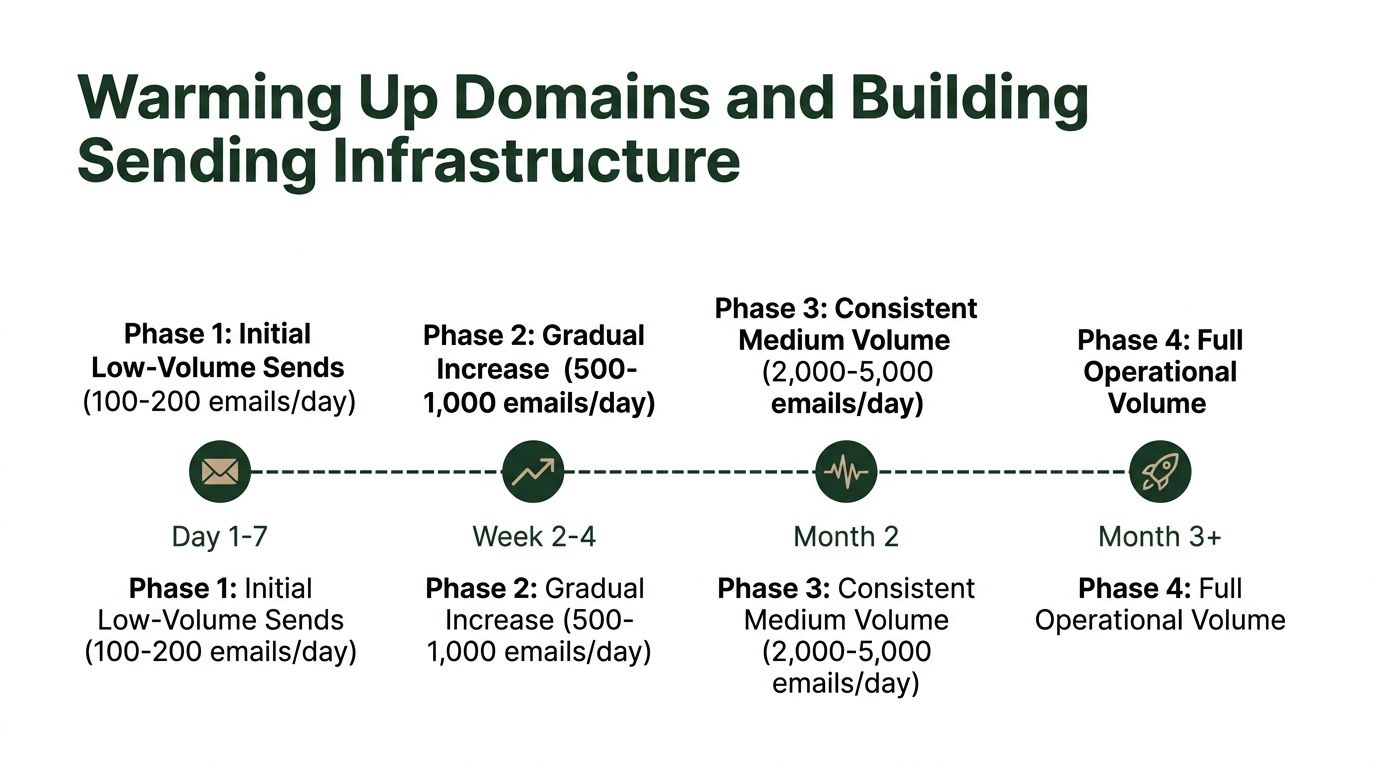
Start with the most engaged or previously contacted recipients from a stable, authenticated mailbox. Keep the cadence consistent, increase gradually, and stop scaling when placement or complaint signals deteriorate. Don't send a large campaign immediately after changing a domain, provider, or campaign type. Each major infrastructure change can create a new reputation event.
The platform matters because it controls retries, suppression, tracking, headers, and sending behavior. For teams running cold email, sequencing, and warming in one workflow, Instantly is a relevant option to evaluate. The tool won't rescue poor targeting, but a platform that supports controlled sequences and operational visibility can make a careful ramp easier to manage.
Keep infrastructure boring
Use reputable sending infrastructure, clean reverse DNS, TLS, branded tracking where appropriate, and shared suppression lists. Dedicated IP decisions should follow actual traffic patterns and operational capacity, not a desire to escape a damaged reputation. A new IP with the same poor audience and aggressive cadence creates another place for the same problem to appear.
Warm-up should be reversible. If Gmail, Yahoo, Microsoft, or an APAC provider shows rising deferrals or spam placement, reduce volume before the provider turns a warning into a block.
The practical curve is straightforward: begin small, earn predictable engagement, scale slowly, and reverse course quickly. Teams can use email delivery platform guidance to compare infrastructure choices, but the platform is only one part of the sending system. Domain separation, list quality, and mailbox-specific monitoring determine whether the ramp holds.
List Hygiene and Bounce Handling as Daily Habits
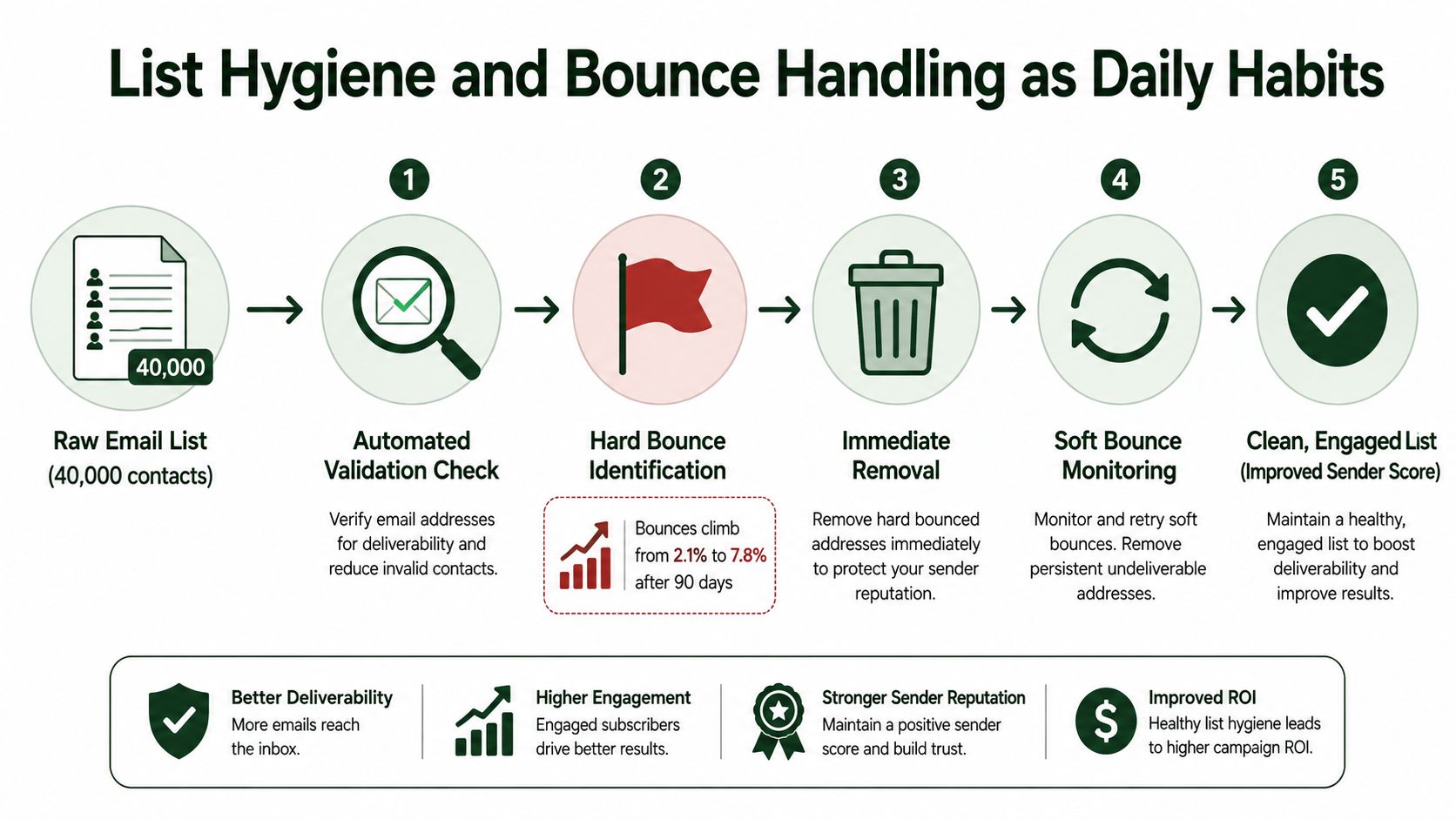
A list can look valuable in a spreadsheet and become a liability in production. Consider a realistic outbound database with 40,000 contacts. Left unfiltered for 90 days, its hard-bounce rate can climb from 2.1% to 7.8%, as illustrated in the provided list-hygiene scenario. Authentication may still pass, but the sender is repeatedly proving to mailbox providers that it sends to stale or invalid addresses.
That kind of decay doesn't need a quarterly cleanup. It needs an operating habit.
Run the list like production infrastructure
A weekly hygiene run should identify role accounts such as info@, support@, and sales@, verify catch-all domains, detect disposable addresses, and repair obvious typographical errors such as gmial.com. Enrichment and validation should happen before sequencing, not after a campaign has already created bounces. For data enrichment, Apollo can be part of the workflow, provided the team still validates address quality and consent expectations before sending.
Hard bounces should enter a shared suppression list immediately after the first permanent failure. Don't let a prospecting tool, marketing platform, and product mail system maintain separate definitions of “do not send.” A complaint should trigger instant global removal, because continuing to mail that address creates an avoidable reputation risk.
Soft bounces require triage rather than automatic permanent deletion. Review the pattern over a short monitoring window, distinguish temporary provider deferrals from mailbox-full conditions, and suppress addresses that don't recover. The exact handling depends on the provider response and the sending system, but repeated temporary failures shouldn't remain invisible.
Treat inactivity as a decision branch
Inactive contacts deserve a single, purposeful re-engagement path, not endless sequence enrollment. If recipients don't respond to a relevant re-engagement attempt, archive or suppress them according to your legal and commercial requirements. A smaller audience with clear engagement is more useful than a large database that repeatedly ignores or rejects mail.
Role accounts: Route them for review or exclude them from automated sales sequences.
Hard bounces: Suppress immediately across every sending system.
Soft bounces: Monitor the provider response, then remove persistent failures.
Complaints: Apply global suppression without waiting for another campaign.
Inactive contacts: Give them one re-engagement opportunity, then archive when there's no signal.
Keep compliance connected to list operations. The email marketing laws guidance can help teams map suppression, consent, and unsubscribe handling to the markets they target. Hygiene isn't a one-time fix. It's how the sending system prevents yesterday's bad addresses from becoming tomorrow's reputation problem.
Content, Cadence, and Engagement Signals
Mailbox providers respond to behavior, not to your opinion of the copy. The same message can reach the inbox from a stable sender with measured cadence and land in junk from a domain that sends in sharp bursts. A polished subject line can't compensate for poor audience fit, sudden volume changes, or recipients who consistently ignore the sender.
Make replies part of the sending design
Reply-driven sequences are safer than batch-and-blast programs because a genuine reply creates a strong engagement event. Pause a sequence when someone responds, route positive intent to a human, and don't continue automated follow-ups after the conversation has started. Sending another scheduled message into an active thread makes the system look disconnected and can irritate the recipient.
Cadence should vary naturally without becoming chaotic. Fixed automation that sends identical messages at predictable intervals can produce a mechanical pattern, while uncontrolled volume creates spikes. Keep each mailbox within a workload the domain can support, then adjust based on provider placement, bounce behavior, complaints, and replies.
The message itself should earn attention. Lead with a specific business problem, keep the subject line consistent with the preview and body, and make the next action easy to understand. Avoid URL shorteners, heavy image payloads, and content that makes a simple prospecting note look like a mass promotion.
Use a production content check
Before launch, review:
Subject alignment: The subject, preview, and body should make the same promise.
Plain-text balance: Keep a credible plain-text version alongside HTML rather than relying on a design-heavy template.
Asset weight: Keep images light enough that they don't slow rendering or dominate the message.
Link quality: Use branded, relevant destinations and avoid shorteners.
Footer requirements: Include a physical mailing address and a clear unsubscribe path where required.
Sequence logic: Stop on replies, opt-outs, complaints, and other suppression events.
The strongest engagement signal is a useful conversation. Design the sequence to create a reply, not merely to generate another send event.
For teams measuring response quality rather than inflated activity, the cold email response rate framework provides a useful way to connect messaging, audience fit, and replies. Social and intent signals can improve who receives an email in the first place. Tools such as Trigify for social signals and Whitewhale for intent signals are relevant when they help the team prioritize timely, higher-fit outreach instead of expanding volume indiscriminately.
Monitoring Inbox Placement by Mailbox Provider
Independent 2025 benchmarking reported 93.8% inbox placement overall, with Gmail at 90.1%. APAC performed materially below Europe, and another regional benchmark placed APAC around 78–80%, the lowest average among major regions. These figures come from the Validity 2025 benchmark report. Aggregate delivery can therefore hide the failure that matters: Gmail may filter a large share of messages while an APAC provider evaluates the same domain and traffic pattern differently.
Use “inbox placement by provider and region” as the main diagnostic view. Gmail weighs engagement, authentication, complaints, and sender reputation through machine-learning systems. Yahoo and Microsoft apply their own expectations around bulk sending, authentication alignment, and complaint behavior. Naver, Daum, QQ, NetEase, and Softbank may also apply local heuristics, reputation history, and whitelist dependencies that global teams fail to test.
Mailbox Provider | Primary Filtering Signal | Postmaster / Feedback Channel | Watch Metric for Remediation |
|---|---|---|---|
Gmail | Engagement, authentication, complaint behavior, and sender reputation | Google Postmaster Tools and available feedback mechanisms | Inbox placement, deferrals, spam rate, and domain reputation |
Yahoo | Authentication alignment, complaint behavior, and bulk-sender policy | Provider reporting and complaint signals | Rejections, spam placement, and authentication failures |
Microsoft | Reputation, authentication, complaint behavior, and traffic patterns | SNDS and feedback loop data | Complaint trends, block responses, and placement |
APAC providers | Local reputation, engagement, locale patterns, and whitelist dependencies | Provider-specific reporting where available | Placement by country, provider, and sending domain |
Create a repeatable monitoring loop
Seed addresses should cover Gmail, Yahoo, Microsoft, and the APAC providers that matter to your audience. Keep the seed list stable for campaign comparisons, but treat it as a controlled signal rather than proof of real-recipient behavior. Review Gmail Postmaster data weekly when the sending volume qualifies, cluster bounce codes at the MX level, and ingest available Microsoft SNDS and feedback-loop signals.
Set a documented remediation path when placement falls below 85%. Pause the affected stream, then isolate authentication, list quality, cadence, content, and complaint causes before retesting. Sending more volume through another provider does not solve a Gmail problem. It hides the cause and may transfer the reputation issue to another stream.
The guide to higher email open rates can support subject-line and attention testing, but opens cannot replace placement data. Use this email marketing metrics reference to separate delivery, inbox placement, replies, complaints, and downstream pipeline signals.
Visible placement also deserves its own measurement. A 2025 report found only 66% of emails reached a visible mailbox location once tabs were included, while 34% landed in spam. Those figures show why “delivered” is an incomplete campaign result. The recipient must see the message in a usable mailbox location, and that outcome varies by provider, region, domain reputation, and engagement history.
A 30-60-90 Day Deliverability Operating Plan
Deliverability improves when someone owns the operating rhythm. The plan below turns authentication, infrastructure, list quality, engagement, and monitoring into work that can be assigned and reviewed.
Days 1 to 30 build the foundation
Inventory every sending domain, subdomain, mailbox, vendor, and message type. Publish aligned SPF, DKIM, and DMARC records, then confirm the live message headers at the providers that matter to your audience. For Gmail and Yahoo senders delivering more than 5,000 emails per day, the requirements include SPF, DKIM, and a DMARC record with at least a p=none policy. Gmail also requires the authenticated domain to match the From domain for DMARC to pass, as described in Gmail and Yahoo sender requirements.
Clear the backlog before scaling. Suppress hard bounces, role accounts, complaints, and contacts with no credible engagement signal. Build a stable seed list and record placement by provider and region. A deliverability issue is easier to solve when the team can compare the same domain and message path over time.
Days 31 to 60 scale with evidence
Ramp warmed subdomains gradually and segment recipients by engagement tier. Send the strongest-fit audiences first, prioritize reply-oriented messaging, and pause automation when recipients respond or opt out. Start collecting Gmail Postmaster data and Microsoft SNDS or feedback-loop signals where eligible, while monitoring APAC providers separately.
This is also the point to connect prospecting data to sending decisions. Apollo can support enrichment, while HeyReach is relevant for LinkedIn outreach and automation when email isn't the only channel. The Social Search operates in this system category by connecting ICP definition, data, messaging, sending infrastructure, routing, and reporting for B2B teams selling into APAC and global markets.
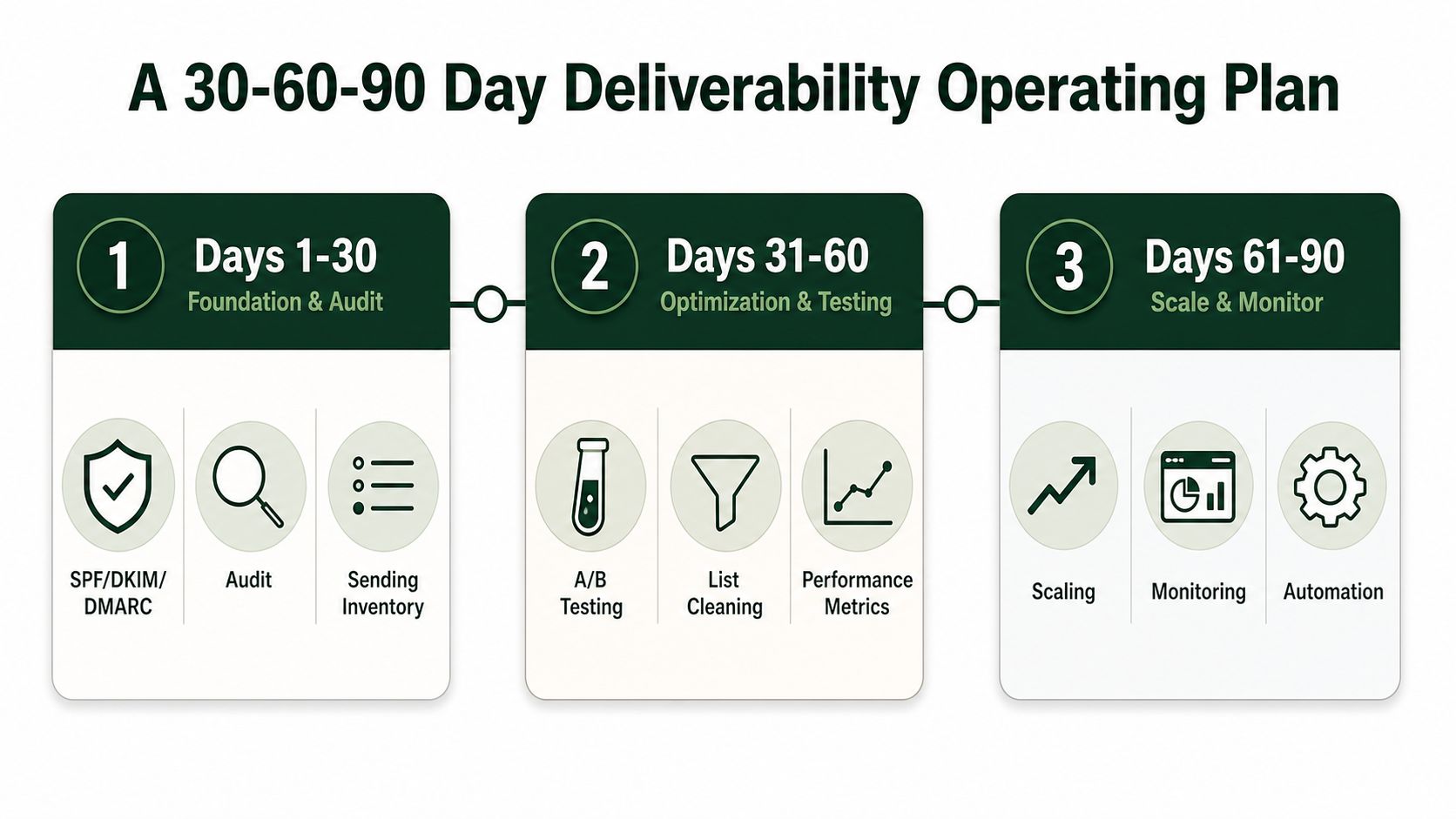
Days 61 to 90 establish steady state
Run weekly placement audits by mailbox provider, maintain one shared suppression list, review bounce-code clusters, and document remediation ownership. Recheck authentication whenever a vendor, domain, or sending workflow changes. Keep the operating dashboard focused on inbox placement, complaints, bounces, replies, and qualified pipeline rather than a single blended delivery figure.
Short FAQ
Should a team use a shared or dedicated IP? Choose based on traffic consistency, technical ownership, and reputation control. A dedicated IP doesn't fix poor lists or weak engagement, and a shared network can work when the provider manages it responsibly.
What does BIMI require? BIMI is an additional brand-display layer, not a replacement for SPF, DKIM, or DMARC. Establish authentication and enforcement first, then evaluate the necessary brand and certificate requirements.
Why can a valid DMARC record still fail alignment? DMARC can fail when the authenticated SPF or DKIM domain doesn't align with the visible From domain. Record presence and policy syntax don't prove that the live message passes.
How long does recovery take after a blocklist incident? There isn't a universal recovery period. The sender must remove the cause, suppress risky recipients, stabilize traffic, and demonstrate consistent behavior to the affected providers before scaling again.
If your outbound system needs more than isolated email fixes, The Social Search designs and operates connected B2B systems across ICP, data, messaging, sending infrastructure, routing, and reporting. Visit the site to discuss a deliverability-aware outbound build for APAC or global pipeline generation.
