Sales Pipeline Automation: The Practical B2B Guide
Learn how sales pipeline automation works in B2B outbound systems. Covers workflows, lead scoring, routing, signals, and best practices that actually convert.
A 12-person B2B sales team in APAC can look busy all week and still have no reliable answer to a simple question: which opportunities deserve attention today? Account data sits in LinkedIn, contact records live in the CRM, outbound activity runs through separate tools, and every rep has a different definition of “qualified.” By Friday, managers are forecasting from memory, spreadsheets, and optimistic stage updates.
That's where sales pipeline automation earns its place. It isn't just a sequence that sends more emails. Done properly, it connects data, enrichment, routing, signals, follow-up, human review, and reporting into one operating system. The standard is not more activity. It's fewer administrative handoffs, cleaner opportunities, faster decisions, and pipeline that leadership can trust.
Table of Contents
When Manual Pipelines Start Breaking
The warning signs usually appear before anyone calls the process broken. Account executives spend large parts of the week updating stages, chasing SDRs for call notes, checking whether a lead came from a campaign or a referral, and reconciling records across LinkedIn, the CRM, and outreach platforms. Nobody owns the mismatch, so every person creates a private workaround.
A lead may enter with one company name, get enriched under another, and route to a rep covering a different territory. The owner field says one thing, the SDR's spreadsheet says another, and the qualification status is missing entirely. The next rep spends time investigating the record instead of advancing the conversation.
The operational test: If a manager needs to ask three people and open two spreadsheets to understand a deal, the pipeline isn't being managed. It's being reconstructed.
The problem gets worse at handoff points. Marketing passes a lead without enough context. An SDR books a meeting but doesn't capture the buying trigger. An AE changes the stage without a clear exit condition. Operations then cleans the CRM after the fact, often after the forecast has already been submitted.
McKinsey Global Institute's historical analysis helped frame this as a broad operational opportunity. Its research found that about one-third of sales and sales-operations tasks could be automated with technology available at the time, while only one in four companies had automated at least one sales process (McKinsey's analysis of sales automation). The important gap is between what the workflow can support and what the team has implemented.
Salesforce data cited in industry coverage puts the time constraint in sharper terms. Representatives spend only 28% of their workweek selling, with 72% going to administrative tasks that automation can absorb (Salesforce sales automation data and industry benchmarks). That doesn't mean every admin task should disappear. CRM judgment, account strategy, and commercial decisions still need people. It does mean repetitive copying, routing, reminders, and hygiene shouldn't consume the hours meant for customer conversations.
What Sales Pipeline Automation Really Means
Sales pipeline automation is a connected workflow that moves, qualifies, routes, and reports on opportunities without requiring a person to perform every handoff. Email sequencing is one component. It isn't the system.
Think of a postal sorting room. Letters arrive with incomplete or inconsistent information. The operation identifies the destination, sorts each item according to rules, flags exceptions, and reports what entered, what moved, and what couldn't be delivered. A revenue workflow should behave similarly.
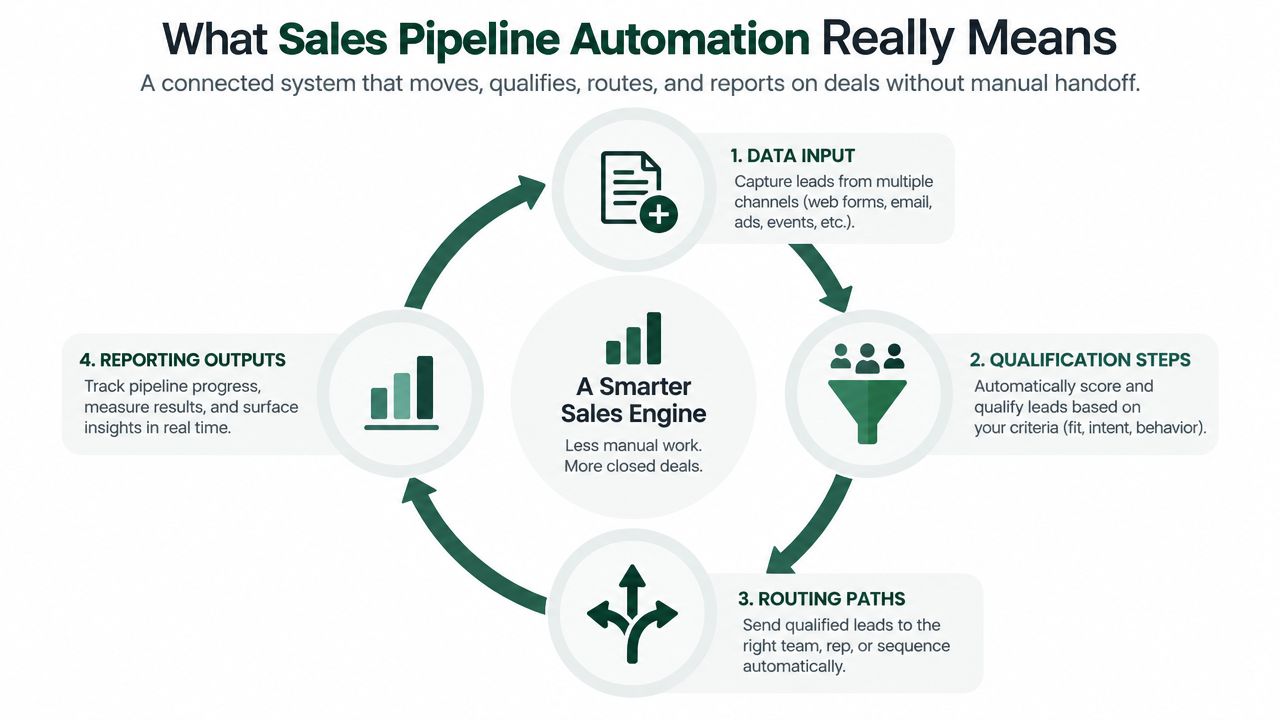
The four connected layers
Data intake and enrichment. Capture the account, contact, source, territory, and relevant company context. Resolve duplicates before a lead enters a campaign or queue. Apollo can serve as a practical foundation for contact and company enrichment when the CRM lacks complete fields.
Qualification and scoring. Apply rules based on fit, seniority, industry, account segment, and recent intent. Keep the logic explainable. A rep should know why an account moved up the queue, not just see an opaque score.
Routing and execution. Assign the record by territory, segment, capacity, or expertise. Once a lead clears the relevant threshold, tools such as Instantly for cold email and sequencing can manage structured follow-up, while HeyReach for LinkedIn outreach automation fits when social touches belong in the motion.
Reporting and feedback. Record the trigger, list, message, owner, stage movement, and outcome. Dashboards then show which workflows create qualified opportunities and which only generate activity.
Revenue operations teams often use this connected view because it joins process design, data governance, and commercial reporting. The distinction is covered in this overview of what revenue operations means. For teams focused on response latency, a separate guide on how to fix slow sales follow-ups is useful because speed problems usually originate in routing and ownership, not only in copy.
The goal is decision quality. An automated task that no one acts on has little value. An automated handoff that puts the right context in front of the right rep at the right time can change the economics of the pipeline.
The Pipeline Stages and Where Automation Earns Its Keep
Most B2B pipelines use familiar labels such as new, working, qualified, opportunity, and commit. The labels matter less than the exit criteria. A record should move because something meaningful happened, not because a sequence sent another email or a rep needed to tidy a dashboard.
The largest leakage often sits between stages. New leads wait for a first touch. Working leads go to the wrong territory. Qualified leads lack a confirmed problem or buying process. Opportunities age without a next step. Commit deals carry optimistic close dates because the CRM doesn't require evidence.
A benchmark compiled from more than 40 studies reports a 2% to 5% median lead-to-customer rate in SMB and mid-market contexts, with 39% MQL-to-SQL and 42% SQL-to-opportunity conversion rates (revenue pipeline automation benchmarks). The same benchmark reports a median sales cycle of about 84 days. Those figures point to a practical conclusion: tightening handoffs often matters more than producing another batch of unqualified leads.
Pipeline Stage | Typical Leakage | Automation That Fixes It |
|---|---|---|
New | Missing context, duplicates, slow ownership | Enrichment, deduplication, territory routing |
Working | Inconsistent follow-up and unclear next action | Sequence logic, task creation, response alerts |
Qualified | Weak fit or no agreed qualification evidence | Scoring, qualification fields, SLA alerts |
Opportunity | Stalled evaluation and absent stakeholders | Signal nudges, aging alerts, next-step checks |
Commit | Stale close dates and incomplete risk data | Stage gates, hygiene checks, manager exceptions |
Cosmetic automation changes the appearance of the pipeline. It advances a stage after an email, creates generic tasks, or sends a follow-up regardless of buyer context. System automation changes the conditions around the deal. It prevents duplicate ownership, detects inactivity, asks for missing qualification evidence, and alerts a manager while intervention still has a chance.
A useful review of prospecting tools can help with the intake layer, but tool selection shouldn't come before defining the stage failures you need to correct. Build around leakage first, then choose the smallest set of tools that closes it.
Lead Routing, Scoring, and Enrichment in Practice
A routing error rarely starts with routing. It usually begins with an incomplete record, a duplicate account, or a score calculated before the team knows who the buyer is. Treat enrichment, scoring, deduplication, and routing as one connected operating sequence.
Start with enrichment. Add company size, industry, role, geography, seniority, technology context, and account ownership before assigning priority. Apollo for data enrichment can support the contact and company data layer. Normalize company names, match domains, and check existing CRM records before creating a new contact or account. This prevents one buyer from entering several workflows under slightly different details.
Apply a transparent score after the record passes those checks. Weight firmographic fit, role relevance, account segment, and trigger recency according to the team's qualification model. The score is a prioritization aid, not a buying prediction. Reps should be able to see why a record received attention and remove points when the underlying data is stale.
Routing then assigns the record by territory, segment, capacity, and expertise. Include fallback rules for out-of-office owners, overloaded queues, and unassigned regions. A high-fit account without an available owner belongs in an exception queue with a deadline. It should not vanish into a successful workflow log.
Layer | What It Does | Tool Example | Common Failure |
|---|---|---|---|
Enrichment | Adds account and contact context | Apollo for data enrichment | Scoring incomplete or stale records |
Deduplication | Prevents duplicate contacts and accounts | CRM rules and data workflows | Enrolling the same person twice |
Scoring | Prioritizes fit and recent relevance | CRM scoring or custom logic | Treating an old score as current intent |
Routing | Assigns ownership and queue priority | CRM workflow | Ignoring territory or rep capacity |
Email execution | Runs controlled follow-up | Instantly for sequencing | Sending before qualification is complete |
Social execution | Adds LinkedIn touches where appropriate | HeyReach for LinkedIn outreach | Copying email behavior into a social channel |
The sequence is operationally important: enrich before scoring, deduplicate before routing, and route before enrolling. If scoring runs first, the model evaluates blanks. If routing runs first, duplicate records create ownership conflicts. If enrollment runs first, outreach may begin before fit, suppression rules, and regional preferences have been checked.
Keep the account and lead model aligned with this target account list framework. A defined account boundary gives automation a clear quality standard. Without one, the system measures activity volume while weak-fit records consume rep capacity. Review exception queues and accepted opportunities against that boundary, not just the number of contacts processed.
Signal Driven Triggers That Replace Static Scoring
A static score ages quickly. A company can fit the ideal customer profile for months without being ready to buy, while a new hiring pattern or technology change can make the same account relevant this week.
Signals should sit above the baseline score, not replace it. Three categories are usually enough to start:
Hiring signals: New roles can indicate a budget, initiative, or capability shift.
Corporate events: Funding, acquisitions, or leadership changes can alter priorities.
Technology events: Adoption, replacement, or expansion of a relevant platform can reveal an active project.
Trigify for social and hiring signals can provide a trigger layer for LinkedIn activity and hiring context. Whitewhale for intent signals fits when website behavior and technographic intent need to feed the workflow.
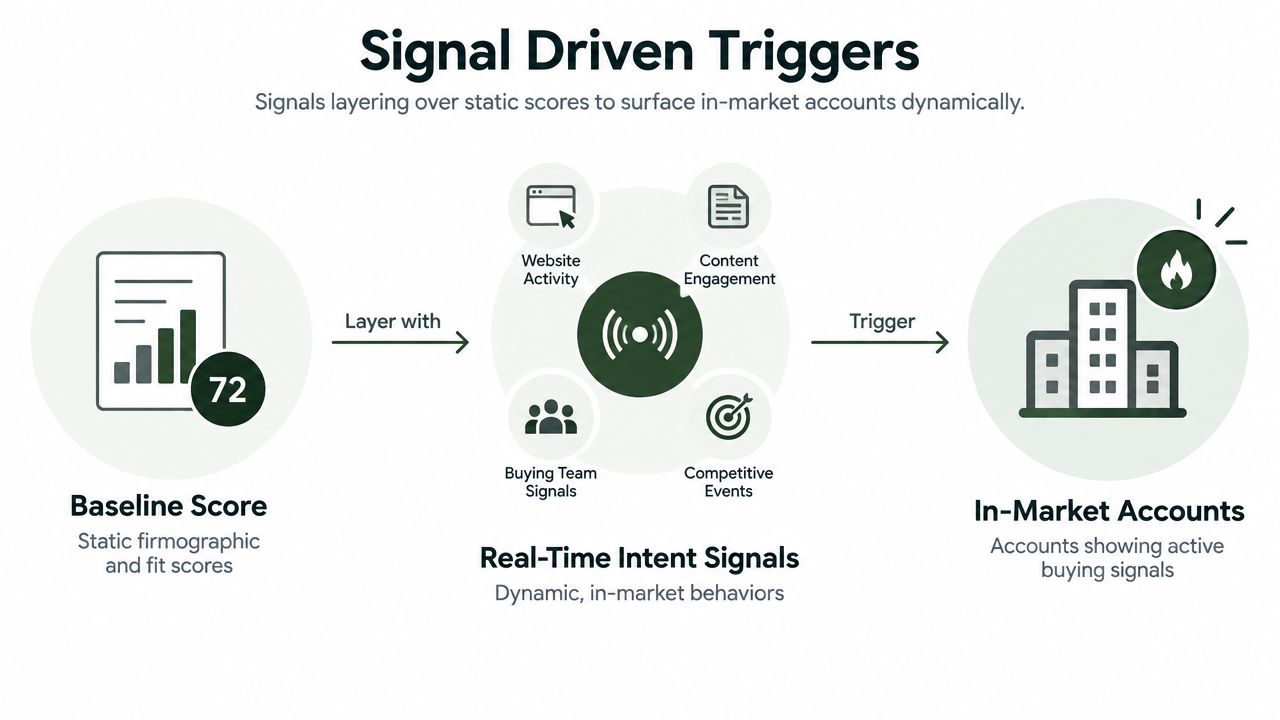
The useful design is a rule stack rather than a single alert. For example, an account with strong fit plus a recent hiring signal can create a high-priority task for an AE within one hour. A single weak signal can go to a weekly review queue. Two signals on the same day shouldn't create two independent campaigns. The orchestration layer needs a contact-level suppression check and an account-level event window so the team responds once with better context.
Signal guidance also recommends stacking multiple signals over time instead of relying on one event. That approach supports actions such as creating a high-priority CRM task after a competitor-page visit, alerting a rep when an email is opened, or adjusting a deal stage when risk appears (sales signal analysis guidance). The important distinction is between evidence that changes priority and activity that merely creates another notification.
The broader prospecting workflow should connect these triggers to account research, ownership, and a channel decision. This overview of prospecting in the sales process provides useful context for making that connection.
Guardrails for Buyer Side AI and APAC Markets
Higher send volume doesn't automatically create better pipeline. Buyers increasingly use automated systems to screen vendors, compare proposals, and handle early diligence. A generic sequence may be filtered before a human sees it, especially when the message looks like a repeated pattern with weak account context.
Deliverability begins with infrastructure, not copy. Secondary sending domains should have MX, SPF, DKIM, and DMARC configured before campaigns launch, as outlined in this guide to outbound sales automation. A 2026 outbound sequence guide recommends warming new domains at 20 to 30 emails per day over four to six weeks, keeping spam complaints below 0.3%, and pausing sequences when complaints rise above 0.1% as an early warning (outbound sequence and deliverability guidance).
The human review boundary
High-value accounts shouldn't move through a fully autonomous sequence by default. Require a rep to review the first message when the account has strategic importance, when the trigger is ambiguous, or when the buying committee spans several markets. Let automation prepare the research and suggested next step. Keep the relationship decision with a person.
Channel mix needs the same discipline. Sequenced contact points can span email, phone, LinkedIn, and other channels, but each touch should have a purpose rather than repeat the same pitch (multichannel outreach guidance).
APAC adds another layer of judgment. Business etiquette, language, response expectations, and preferred channels vary across Japan, Singapore, Australia, and India. Some buyers may prefer LINE or WeChat over email, while others expect a more direct commercial conversation. Translation alone isn't localization. Teams need local review of formality, timing, titles, proof points, and the amount of relationship-building that precedes a sales ask.
Automate the boring work. Gate the relationship.
Measuring Whether Automation Actually Improves Pipeline
The first dashboard teams build is usually the wrong one. It shows emails sent, calls logged, tasks completed, and meetings booked. Those figures describe machine output. They don't show whether the machine is producing qualified opportunities.
A stronger measurement model has four layers:
Velocity: Track time to first touch, stage-to-stage duration, opportunity aging, and the delay between a signal and a human response.
Conversion: Compare MQL-to-SQL, SQL-to-opportunity, and opportunity-to-close by source, list, trigger, and message.
Attribution: Capture which signal or sequence produced the first meaningful reply, meeting, and opportunity. Separate assisted touches from the event that changed the deal.
Stage hygiene: Monitor required-field completion, duplicate records, missing next steps, stale close dates, and dead-lead decay.
A benchmark for pipeline reporting reports weekly reporting time falling from 2 to 4 hours to 15 to 20 minutes, data staleness compressing from 3 to 7 days to under 4 hours, and stall-detection lag improving from 1 to 2 weeks to 24 to 48 hours (pipeline reporting automation benchmark). It also reports forecast accuracy moving from 60% to 70% to 78% to 88%, while new deals missing a close date fell from 35% to 50% to under 10% in the benchmark comparison.
Metric Layer | What to Track | Benchmark |
|---|---|---|
Velocity | Reporting delay, data freshness, stall detection | Use the benchmark ranges above as a reference point |
Conversion | Stage conversion by source and trigger | Compare against the 2% to 5% median lead-to-customer rate in the independent benchmark |
Attribution | First meaningful reply, meeting, and opportunity source | Require source, signal, list, and message fields |
Hygiene | Duplicates, missing fields, stale dates, dead leads | Set internal quality thresholds before launch |
Don't turn these figures into universal targets. Your scorecard should show whether automation improves opportunity quality and forecast confidence, not whether it increases message volume. A practical reporting model can be built around sales pipeline reports, provided every dashboard metric connects to a decision someone will make.
Building Your Automation System in Ninety Days
A ninety-day rollout works when each phase creates a usable foundation for the next. Trying to deploy enrichment, scoring, signals, multichannel sequences, and forecasting at once usually hides data problems until they affect live prospects.
Days 1 to 30 build the foundation
Audit the CRM first. Normalize stage definitions, ownership fields, account names, source values, and required qualification fields. Fix duplicate rules and decide when a lead becomes inactive. Start with two automation layers, usually enrichment and routing, because they improve the records that every later workflow depends on.
Days 31 to 60 add prioritization
Layer scoring and signal triggers over the cleaned base. Trigify can support social and hiring triggers, while Whitewhale can contribute web and technographic intent. Send notifications to Slack or the rep inbox only when the event requires action. Every alert needs an owner, a response window, and a suppression rule.
Days 61 to 90 add control loops
Introduce attribution reporting, message review, bounce and complaint monitoring, and stage-quality checks. Compare automated and manually handled groups where practical. Review false positives, duplicate alerts, poor-fit meetings, and opportunities that advanced without evidence.
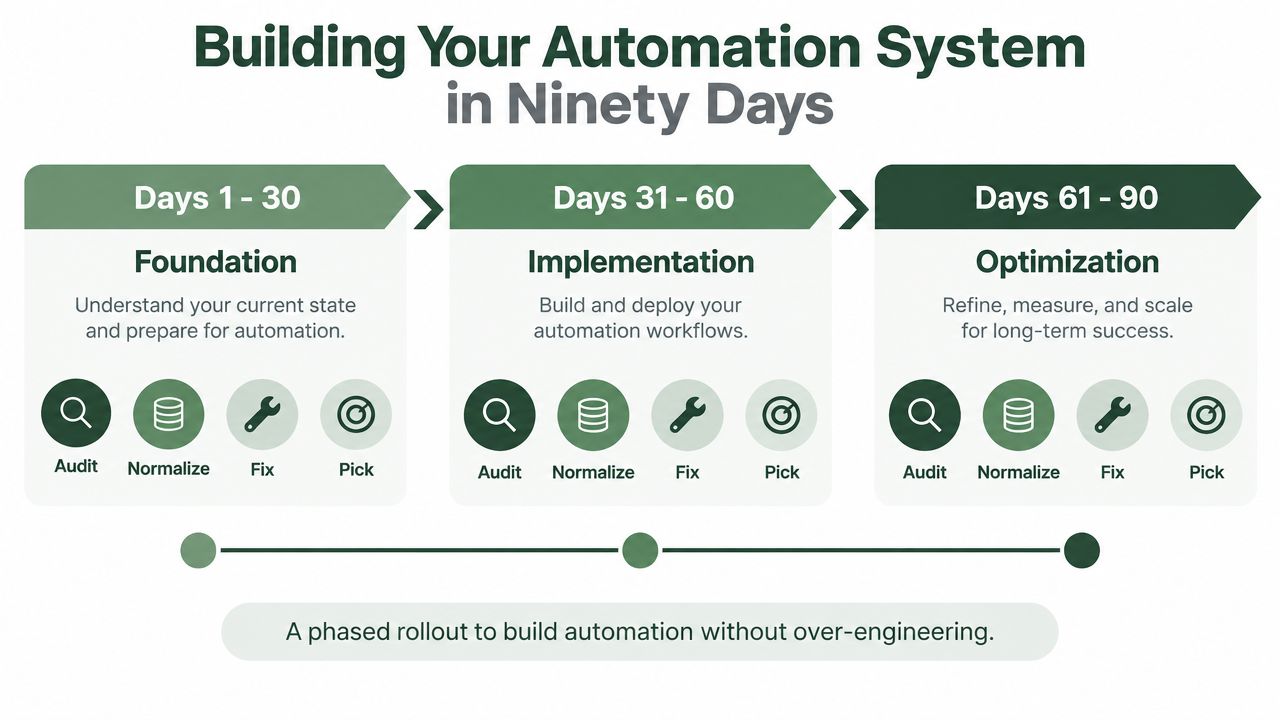
Use this sales automation process as a checklist for the build:
Data hygiene: Normalize records, deduplicate accounts, and define decay rules.
Routing logic: Document territory, segment, capacity, and fallback ownership.
Score calibration: Explain every score and review false positives.
Signal rules: Stack triggers, set event windows, and suppress duplicate contact.
Review cadence: Inspect deliverability, message quality, routing failures, and stage movement.
Dashboard publishing: Attribute meetings and pipeline to lists, signals, messages, and owners.
The Social Search can build and operate this kind of connected outbound system for B2B teams, including ICP definition, data, messaging, email and LinkedIn execution, signal-driven routing, reporting, and rep enablement. Visit The Social Search to discuss a pipeline automation system that your team can own, measure, and improve across APAC and global markets.
