Lead Generation List Building for B2B Teams
Master lead generation list building for B2B outbound. Learn how to define your ICP, source and enrich data, and build a verified pipeline engine.
Most advice on lead generation list building starts in the wrong place. It tells you to find more names, buy a larger database, or export another batch of contacts. That approach creates a temporary feeling of progress while the underlying asset becomes less reliable every month.
A B2B list isn't a spreadsheet you finish. It's an operating system for outbound, with inputs, validation rules, routing logic, and a refresh schedule. B2B data decays at roughly 2.1% per month, which compounds to about 22.5% annually, according to Demandbase's overview of B2B data vendors. If nobody verifies, segments, and refreshes the records, nearly one in four can become inaccurate within a year.
The practical stack should reflect that reality. Use Apollo for data enrichment, Instantly for cold email, deliverability, warming, and sequencing, and connect social or intent data only when it changes who gets contacted and when. The system matters more than any individual database.
Table of Contents
Why Static Lists Destroy Outbound Pipeline
The popular assumption is that list building ends when a researcher exports a CSV. It doesn't. A contact can change jobs, a company can alter its domain, a department can be reorganized, and a once-accurate title can stop describing buying authority. The record remains in the CRM, but its usefulness has already changed.
That distinction matters because list building and lead generation aren't the same function. List building compiles and verifies contact data for outbound prospecting. Lead generation is broader, covering the process of attracting and qualifying potential buyers through marketing activity, as Data to Leads explains in its distinction between the two. The list feeds the outbound motion, but it doesn't create demand by itself.
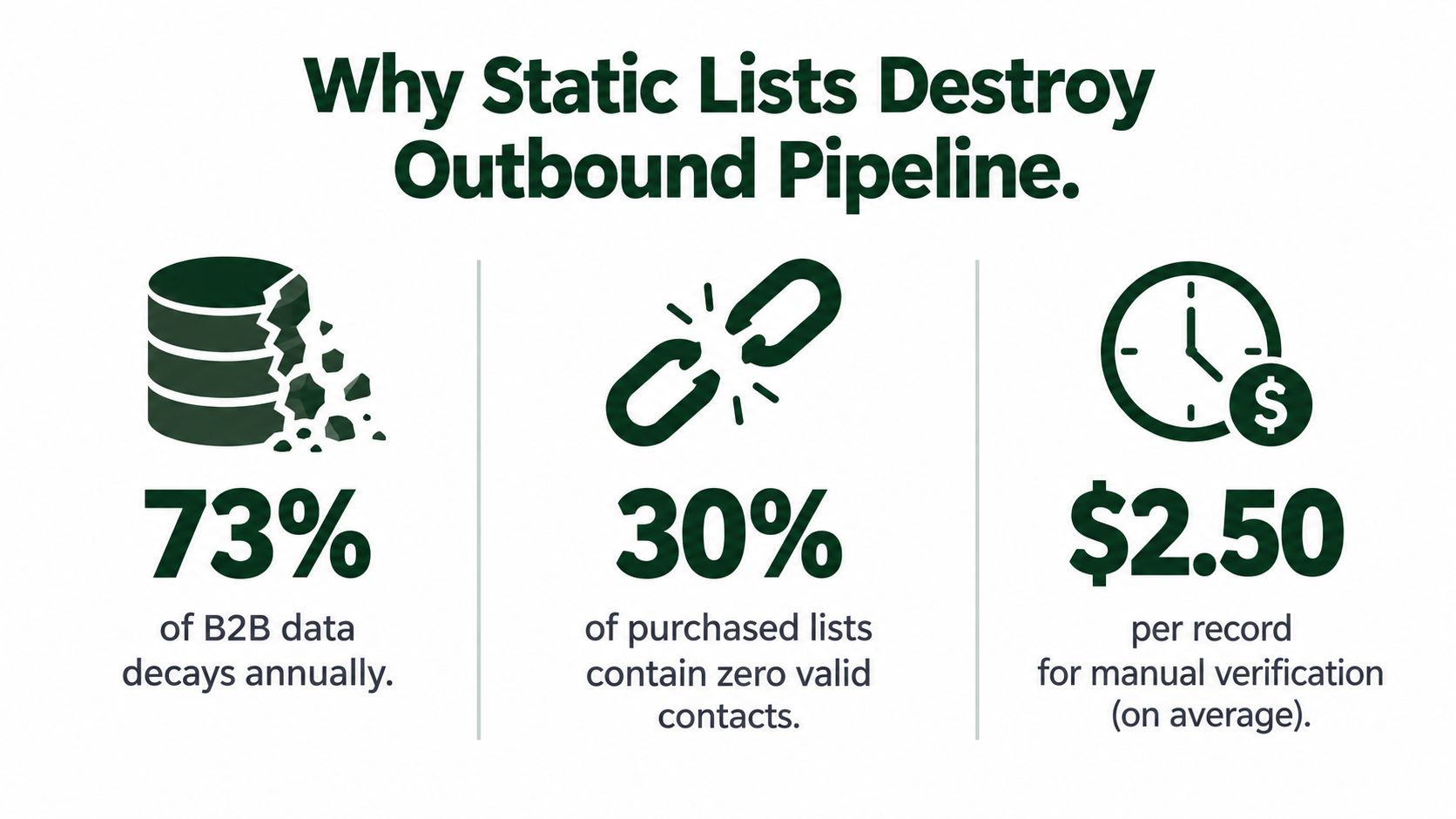
The infographic's figures shouldn't be treated as a license to repeat unsupported benchmarks. The verified operational point is simpler: static data loses contactability and role fit, and outbound teams pay for that loss through failed delivery, irrelevant messages, and wasted research time.
Freshness is a pipeline control
A stale record creates several problems at once:
Contactability: The address may no longer accept mail, or the person may have left.
Role fit: A former champion may no longer own the problem.
Account fit: The company may have changed its market, technology, or operating model.
Routing accuracy: A record assigned to the wrong segment can enter the wrong sequence.
That's why a modern database needs acquisition dates, source-vendor fields, verification status, role history, and segment labels. It should tell an operator not only who the contact is, but when the record was checked and why it belongs in the campaign.
Practical rule: Treat every contact as a temporary hypothesis, not a permanent asset.
For teams working from social activity, it can also help to build social monitoring pipelines that identify relevant public signals before outreach. The signal doesn't replace verification, but it can prevent a clean, accurate list from becoming a badly timed one. For account planning, this target-account-list framework provides another useful way to organize coverage around accounts rather than isolated names.
Defining the ICP and Quantifying Market Depth
Pulling email addresses before defining the ICP is how teams create expensive ambiguity. You need a clear account definition first, then a contact definition inside that account. The combination determines whether your list can support a repeatable outbound motion or only a small experimental campaign.
Start with firmographics, but don't stop there. Apollo's qualified lead-list guidance recommends filtering around criteria such as industry, headcount, technology stack, and funding stage, then adding signals including job changes, hiring surges, and content engagement. Those filters work because they describe both structural fit and current business context.
A useful ICP has four layers:
Firmographic fit: Industry, company size, geography, revenue band, and business model.
Technographic fit: Platforms already installed, integrations required, and systems your offer replaces or complements.
Operational fit: The workflow or bottleneck your product addresses, including the team that owns it.
Trigger fit: Evidence that the problem may be active, such as hiring, leadership movement, expansion, or relevant engagement.
Measure the market before collecting contacts
Separate the market into TAM, SAM, and SOM before you build the contact file. TAM is the broad universe that could theoretically need the category. SAM narrows that universe to accounts you can serve by geography, product scope, and delivery model. SOM is the portion you can realistically reach with your channels, capacity, and commercial constraints.
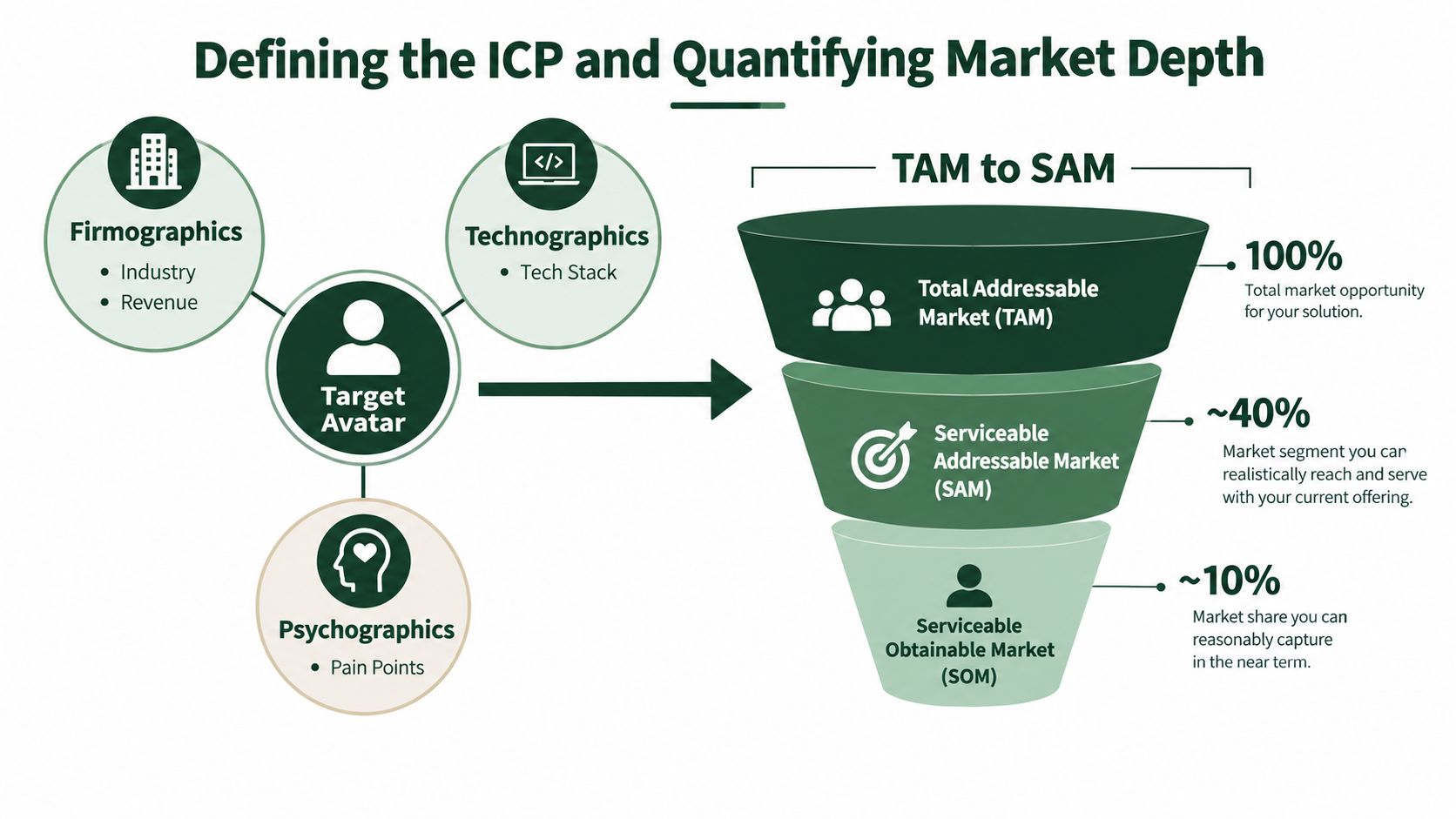
The useful output isn't a decorative market-size slide. It's a segment inventory that answers practical questions:
Question | Operational answer |
|---|---|
Which accounts fit? | Defined by firmographic and technographic rules |
Which roles matter? | Mapped to the buying process, not just seniority |
Which triggers raise priority? | Observable events linked to the problem |
Can the segment sustain outreach? | Assessed through account count and contact depth |
What should be excluded? | Documented disqualifiers and risk conditions |
Avoid an ICP so narrow that every campaign exhausts the segment immediately. Avoid one so broad that SDRs can't tell why a contact belongs. A good definition is specific enough to guide sourcing and flexible enough to produce testable subsegments.
For a deeper working model, use this guide to defining an ideal customer profile. The key is to turn the ICP into filters, fields, and routing rules. If a criterion can't be captured or checked in your data workflow, it isn't yet operational.
Sourcing and Enriching Accounts with Waterfall Logic
A single provider gives you a convenient view of the market, not a complete one. Different vendors have different coverage by region, industry, seniority, and contact type. Even when a provider has a record, its title or email may be old.
Waterfall enrichment handles that weakness by querying sources in sequence. Start with the account and primary contact data, then use a second provider for missing fields, a third for unresolved work emails or direct dials, and a verifier before delivery. The workflow should preserve provenance, so every enriched field has a source and a timestamp.
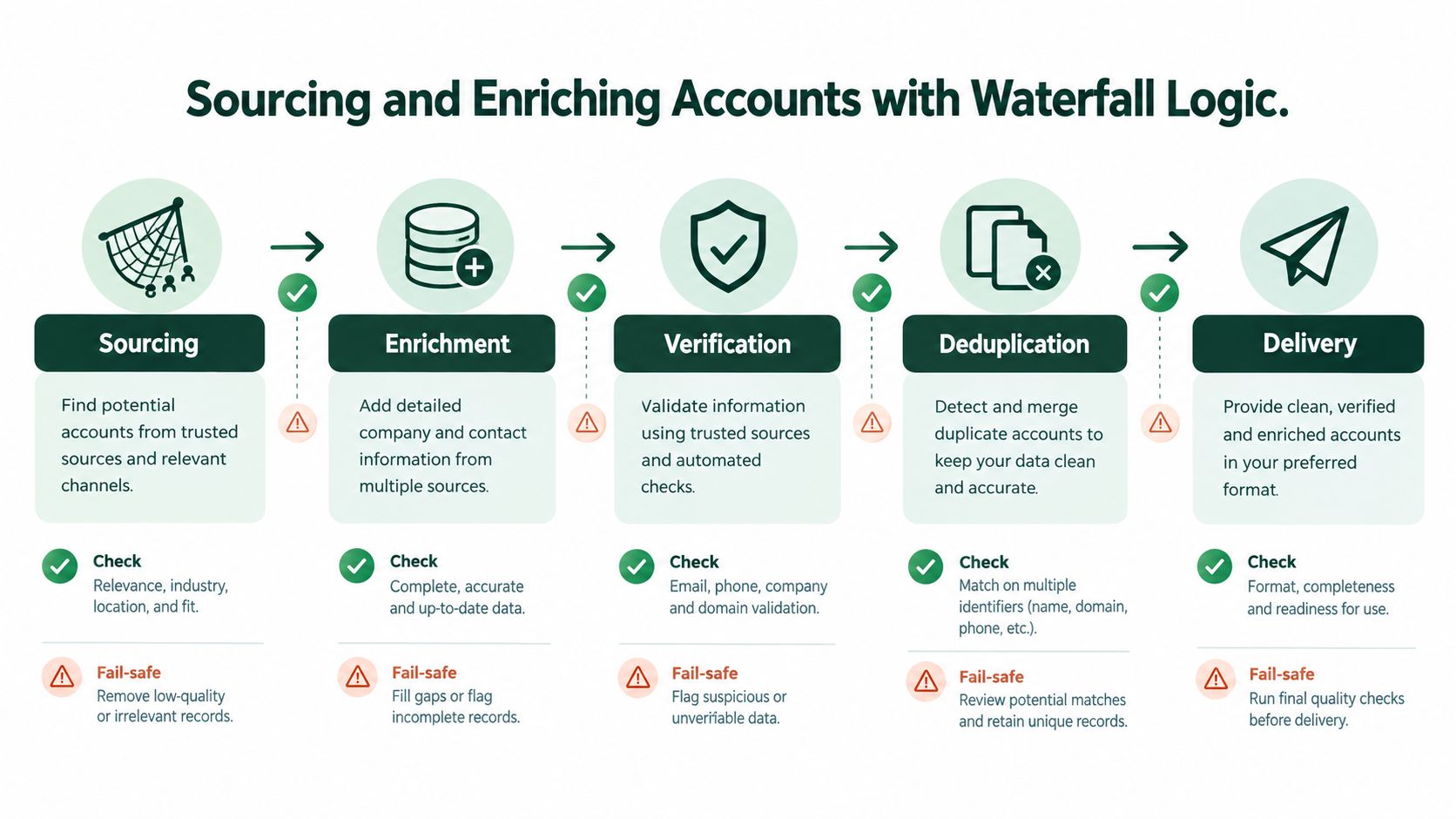
A practical sequence looks like this:
Source accounts: Apply ICP filters and create the account universe.
Map stakeholders: Identify the roles involved in the buying process.
Enrich gaps: Fill missing company, role, technology, and contact fields.
Verify and deduplicate: Check contactability and remove conflicting records.
Deliver with context: Send only campaign-ready records into CRM and sequencing.
Build account depth, not just contact volume
Complex B2B deals rarely depend on one person. A 2026 lead-list guide from Lusha recommends six to ten stakeholders per complex B2B deal, with records re-verified every 60–90 days and tagged by acquisition date and source vendor. That approach lets you measure whether a source creates useful account coverage, rather than rewarding it for producing names.
Account depth should reflect the buying group. Map the economic owner, operational owner, technical evaluator, likely champion, procurement contact, and users affected by the change. You won't always need every role in every segment, but you should know which roles are missing before launching.
The trade-off is cost. More sources and more stakeholders increase enrichment spend, while aggressive filtering can leave important buying paths uncovered. One benchmarked implementation puts the cost of a verified contact at $0.18 to $0.31, making source stacking and verification important cost-control levers, as documented by Grou Global's B2B prospecting workflow.
The right optimization target isn't the cheapest record. It's the lowest cost for a usable, verified account opportunity.
For teams formalizing handoffs, this sales automation process guide is useful for connecting sourcing, enrichment, routing, and execution rather than treating list delivery as an isolated task.
Validation Workflows and Deliverability Protection
Verification belongs between enrichment and outreach, not after the first campaign fails. A contact record can look complete while still containing a risky address, a duplicate, a role account, or a mismatch between the person and company.
Use a staged validation workflow:
Normalize records: Standardize names, domains, titles, countries, and company identifiers.
Remove duplicates: Deduplicate at both contact and account level, preserving the strongest record.
Check email status: Run every address through a verification service before sequencing.
Review risky categories: Isolate catch-all, role-based, unverifiable, and recently changed records.
Report by segment: Track quality by source, region, role, and acquisition date.
Don't buy a list and assume the vendor's export is campaign-ready. SiteGround's email deliverability guidance warns against buying lists or adding people without permission, and recommends double opt-in whenever possible to confirm an address before it enters a list. For cold outbound, legal and consent requirements also depend on the jurisdiction and message type, so compliance review needs to sit alongside technical validation.
Set an audit trigger
Bounce rate is a useful operational alarm. SalesHive identifies rates above 3% to 5% as a common trigger for an immediate list audit. Don't wait for a campaign to reach that range if a segment shows unusual failures, poor role fit, or inconsistent source quality.
Keep sequencing isolated from raw research data. Instantly can handle the sending and sequencing layer, but only verified, segmented records should enter it. LinkedIn outreach should follow the same discipline. Automation doesn't repair bad targeting, and adding another channel doesn't make an unverified contact more relevant.
Use segment-level reporting to answer whether the issue comes from a source, a region, a role cluster, or the message itself. This email deliverability testing resource can support the diagnostic process, but the operating principle is straightforward: protect the sending infrastructure before optimizing copy.
Prioritizing Accounts with Intent and Social Signals
A verified list tells you who could fit. It doesn't tell you who deserves attention today. That decision comes from combining stable fit data with changing signals.
Intent signals can include relevant content engagement, hiring activity, technology changes, leadership moves, or other observable events. Social signals add context from public conversations and professional activity. Used carefully, they help the team distinguish an account that merely matches the ICP from one where the problem may be active.

Turn signals into routing rules
Avoid creating a vague “high intent” label that nobody uses consistently. Define what each signal does to priority and ownership:
Signal | Interpretation | Routing action |
|---|---|---|
Relevant hiring activity | The account may be investing in an adjacent capability | Route to the segment owner |
Recent job change | A buyer may be reassessing tools or processes | Use a role-specific sequence |
Content engagement | The topic has entered the account's attention | Add context, without overstating intent |
Public social discussion | A person has expressed a relevant concern or question | Consider manual, contextual outreach |
Multiple signals together | Fit and timing are reinforcing each other | Prioritize for human review |
Whitewhale fits the intent layer, while Trigify can help surface social signals. Neither should be treated as proof that an account is ready to buy. A signal is a reason to investigate, not permission to make a claim about a prospect's internal plans.
Use a simple priority model
Score accounts using separate fields for fit, contact quality, signal strength, and timing. Keep the components visible instead of collapsing everything into one opaque number. An SDR should be able to see why an account was promoted and what action the system expects next.
For example, an account with strong ICP fit but no current signal can remain in a monitored segment. An account with moderate fit and a strong signal may deserve review, but shouldn't automatically outrank a high-fit account with several relevant contacts. This separation protects the team from chasing noisy activity.
Social outreach also needs restraint. This LinkedIn lead-generation guide offers useful channel context, but automation should never substitute for relevance. Personalize around a real business event, avoid implying private knowledge, and stop routing when the signal expires or the contact changes role.
Maintaining List Freshness and Operational Cadence
The maintenance schedule should be visible on the revenue team's calendar. Apollo recommends re-verifying lead-list records every 60–90 days, because stale records reduce list quality and deliverability. That cadence gives operators a clear control point instead of leaving freshness to memory.
A practical 60-day cycle can run like this:
Day 0: Add the account and contact, record the acquisition date, source vendor, ICP segment, role, and verification result.
Day 30: Review hard changes, including job moves, company changes, domain updates, and new disqualifiers.
Day 60: Re-verify contactability, refresh enrichment, and compare source performance against other segments.
After review: Keep, repair, suppress, or replace the record. Preserve the reason for the decision.
Measure decay by segment
Don't judge list quality only through campaign totals. A campaign can hide a weak source behind a strong segment, or make a good segment look poor because the message was wrong.
Track source and segment fields through the entire funnel:
Account acceptance
Contact verification
Delivery outcome
Positive and negative replies
Meetings or qualified opportunities
Suppression reasons
Time since last verification
B2B data decay estimates vary by source and methodology. [SalesHive reports rates up to 70.3% annually and links inaccurate or incomplete data to about 27.3% of sales representatives' time, or roughly 546 hours per year, while Demandbase's reference point is about 22.5% annual decay. The gap is precisely why your own source-level reporting matters more than one universal benchmark.
Maintain a holdout group of records that aren't refreshed immediately, then compare their quality with refreshed records during review. That gives you evidence about decay by region, segment, role, and provider. The result is a living database, not a recurring spreadsheet project.
The Social Search designs outbound systems that connect ICP definition, verified account and buyer lists, signal-based routing, messaging, sequencing, and reporting for B2B teams selling into APAC and global markets. If your current process produces contacts but not a maintainable operating cadence, visit The Social Search to discuss building and running a system your team can own.
