Email Sequence Template: Cadence, Copy and Compliance
Build an email sequence template with a five-touch cadence, copy you can send today, deliverability checks and compliant opt-out rules.
You've got a prospect list, a draft email, and a follow-up that says little more than checking in. The team wants to launch, but nobody has decided what happens when someone replies, complains, or asks to be left alone. That's how a reasonable outbound campaign becomes an operational mess.
A useful email sequence template includes more than copy. It defines the cadence, permission checks, sending limits, test variable, and reply owner. Build those controls before launch, then judge the sequence by qualified conversations rather than activity.
Table of Contents
Five-Touch Email Sequence Template at a Glance
Touch | Send day | Purpose | Stop rule |
|---|---|---|---|
1. Opening email | Day 0 | Test one value hypothesis | Stop on reply, opt-out or bounce |
2. First follow-up | Day 2-3 | Add a new proof point | Stop on reply or buying-signal change |
3. Second follow-up | Day 5-7 | Offer a resource or short case study | Stop on reply, opt-out or bounce |
4. Value-led follow-up | Day 7-10 | Share one specific insight from the industry | Stop on reply or opt-out |
5. Permission closeout | Day 10-14 | Ask whether the topic is still worth discussing | Stop on reply or opt-out |
Use this as a proposed launch schedule, with days counted from the opening email, not from the previous touch. Choose an actual send day within each window before activating the sequence. Every stop condition applies globally, even where the table highlights a particular check.
I recommend Instantly for sequencing and sending controls so timing and stop rules don't depend on someone remembering to send manually. For the upstream workflow, consider Apollo for data enrichment and Whitewhale for signal-led prospecting. Neither enrichment nor a buying signal establishes permission to contact someone.
Treat the cadence as an experiment
Start with a narrow ideal customer profile, one buyer problem, and one offer. A revenue leader hiring SDRs needs a different argument from a founder testing a new market, even if both sell SaaS.
The cold-email analysis published in the Journal of Business and Entrepreneurial Studies cites approximately 42% of replies coming from follow-ups, supporting a sequence rather than an isolated opening message. That doesn't justify sending every planned email regardless of recipient behavior.
Change one variable between test cells, not a different variable in every successive email. Compare alternative opening claims, proof points, calls to action, or intervals while holding the sender, audience quality, and offer steady. Otherwise, you won't know which change improved the outcome.
Prepare the closeout before launch, too: “Is SDR ramp still worth discussing, or should I close this out?” Don't imply that silence creates permission for another campaign.
Launch rule: Stop the sequence immediately on reply, opt-out, bounce, or a buying-signal change. Record the outcome before deciding what to test next.
Permission and Opt-Out Rules by Recipient Type
A purchased list isn't permission, and a company address isn't a blanket exemption. Classify recipients before importing them into an active sequence.
For UK contacts, the ICO's PECR guidance distinguishes corporate subscribers, including limited companies and LLPs, from individuals, sole traders, and certain partnerships. Unsolicited email to corporate subscribers doesn't require consent under that part of PECR, but using an employee's personal data can still create data-protection obligations; individual subscribers generally need consent or a valid soft opt-in.
Use recipient classification as an operational field, not a note buried in a spreadsheet.

Establish permission before automation
The ICO's business-to-business marketing guidance explains that bought-in lists require specific consent for that type of email from the sender where consent is needed. The soft opt-in concerns details obtained during a sale or negotiation for a sale, marketing similar products or services, with an opt-out offered at collection and in subsequent messages.
For US commercial email, the FTC's CAN-SPAM compliance guide requires accurate headers, nondeceptive subjects, and a clear opt-out mechanism that works for at least 30 days after sending, with requests honored within 10 business days. Operationally, suppress immediately across every later step and campaign, rather than waiting for the legal deadline.
Use the email marketing laws guide to organize market-specific review. If enriched contact details also feed calling or texting, consult SkipForge's TCPA compliance for skip tracing outreach, because email clearance doesn't settle obligations for other channels.
Run these checks before every send:
List provenance: Record where the address came from.
Permission status: Preserve the applicable consent or other eligibility record.
Audience classification: Separate corporate subscribers from individual recipients.
Suppression: Check the central record, not just the current campaign's unsubscribe list.
Deliverability Settings to Check Before the First Send
Publish authentication records. Configure SPF, DKIM, and DMARC for the sending domain, then confirm authentication passes.
Verify every address. Remove invalid addresses before activating the list.
Check suppression. Exclude previous bounces, opt-outs, and complaints.
Set a gradual daily ramp. Start low and increase consistently rather than releasing a backlog in bursts.
Confirm unsubscribe handling. Include a visible opt-out and configure one-click unsubscribe where required.
Schedule daily monitoring. Assign an owner who can pause sending without waiting for approval.
Make the infrastructure checks visible to whoever approves the campaign.

Separate provider requirements from operating rules
Google's sender guidance identifies bulk senders at about 5,000 messages to Gmail accounts within 24 hours, requires one-click unsubscribe for bulk marketing or subscribed messages, and advises keeping reported spam below 0.1% while avoiding 0.3% or higher. The actions below are campaign operating rules built around those requirements, not guarantees of inbox placement.
Metric | Threshold or trigger | Action |
|---|---|---|
Bulk sender volume to Gmail | About 5,000 messages within 24 hours | Treat as a bulk sender and support one-click unsubscribe |
Reported spam rate | Below 0.1% | Continue expansion only while other health indicators remain stable |
Reported spam rate | 0.3% or higher | Stop sends to the affected segment and investigate |
Hard-bounce rate | Any hard bounce; investigate an increase against baseline | Suppress bounced addresses immediately |
Positive-reply rate | Decline against the previous sequence version on a comparable audience | Compare targeting and offer before scaling |
Complaint rate is more actionable than open rate because privacy mechanisms and automated scanning can register opens without a person reading the message. A technically delivered message also isn't necessarily an inboxed message.
Validity's 2025 benchmark report found that one in six legitimate marketing emails failed to reach the inbox. That is a marketing-email finding, not a cold-outbound performance target, but it shows why rewriting copy alone can't resolve every weak campaign.
Write the pause rule before launch
If complaints approach the lower warning level, pause expansion, inspect list provenance and message-market fit, and narrow targeting. Never respond to weak results by increasing volume.
Review hard-bounce rate, spam complaints, authentication status, inbox placement, positive-reply rate, and meetings per delivered message daily. Keep delivered, inboxed, opened, replied, and interested-replied contacts separate wherever measurement supports that distinction.
Use Instantly's warm-up, daily send limits, and inbox-placement monitoring to manage sending infrastructure, while checking what your account configuration measures. Warm-up doesn't override recipient relevance or permission.
If inbox placement falls or complaints rise, shorten the working sequence to three touches, restrict it to the highest-intent eligible segment, and hold volume flat until sending health recovers.
The email deliverability best-practices guide can support the operating checklist. Assign a recovery owner and document what must improve before expansion resumes.
Writing the Opening Email and Its Subject Line
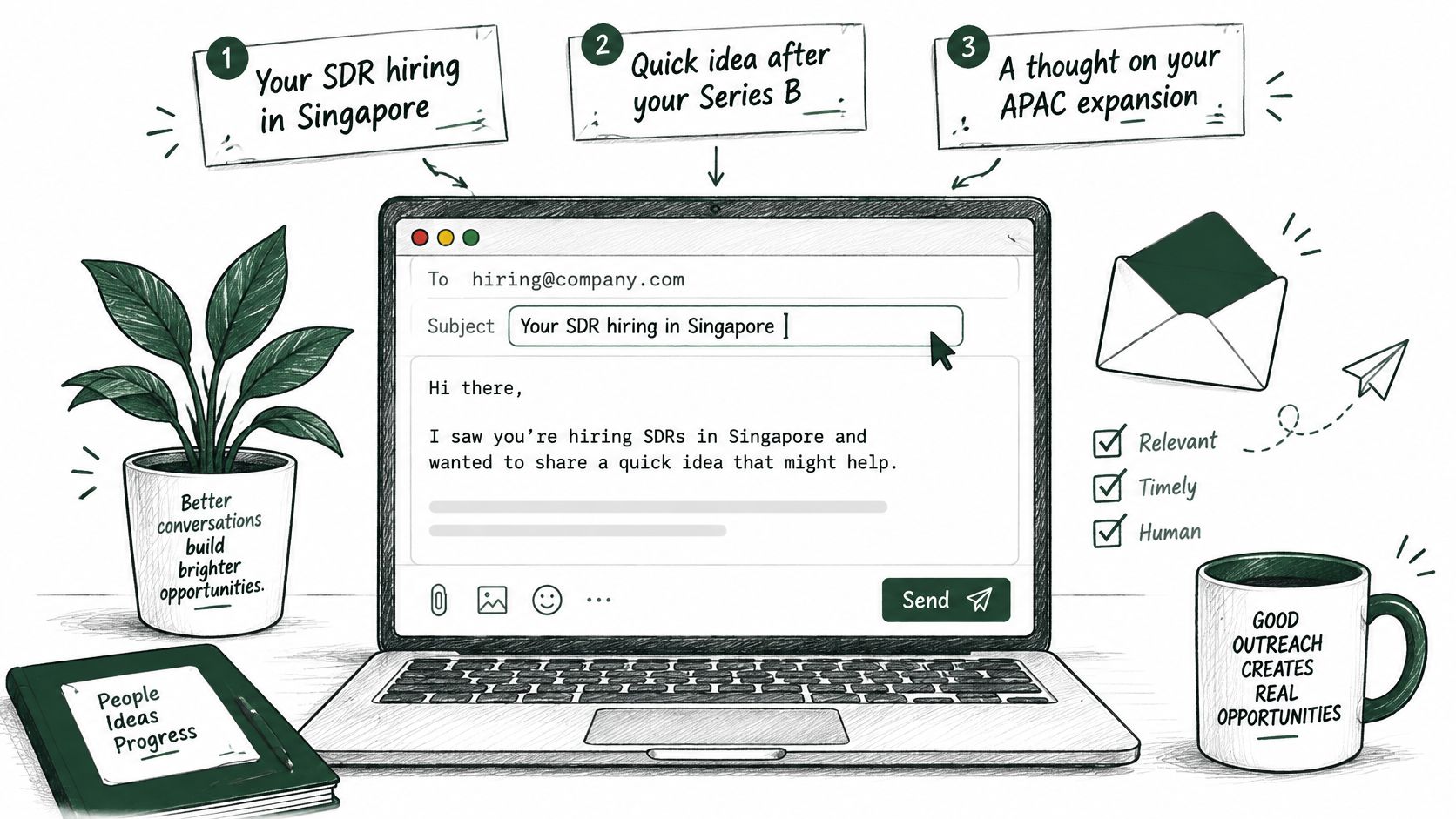
Start with a subject that accurately describes the message. Aim for fewer than six words as an editorial constraint, not a promised performance advantage.
Named trigger: Your SDR hiring in Singapore
Specific outcome: Faster first meetings
Plain problem question: SDR ramp taking too long?
The outcome subject is useful only if the body explains a credible mechanism. Don't imply a measured result you can't substantiate.
Keep the drafting checklist beside the message, rather than trying to remember it during review.
Build the body around a single problem
Use this order: context, identity, value hypothesis, proof, and next step. Name the trigger first, explain why you're writing, then connect your offer to a plausible business problem without pretending you know the prospect's internal performance.
Say a fintech company is hiring three SDRs in Singapore. The draft below is a hypothetical example, with a proof field that must be replaced by an approved, documented result before sending.
Subject: Your SDR hiring in Singapore
Hi [First name],
Your careers page lists three SDR openings in Singapore.
I'm [Name] at [Company], and we build outbound onboarding workflows for B2B sales teams.
If those hires will open new accounts, a shared prospecting and reply-handling playbook could help them reach their first qualified conversations sooner.
In [approved comparable project], time to first booked meeting changed from [verified baseline] to [verified outcome].
Would a two-page breakdown of the workflow help?
[Sender signature]
If this isn't relevant, reply and I'll stop contacting you.
The proof sentence is deliberately unfinished because invented specificity is worse than no metric. If you don't have a defensible numerical result, replace it with a concrete artifact you can demonstrate, such as an annotated onboarding workflow, and don't present that artifact as outcome evidence.
Test the ask before polishing everything
I would test the call to action first when delivery is healthy but qualified replies are weak. Compare a resource offer with a plain relevance question while keeping the sender and list criteria fixed.
Test subject lines separately. Use qualified replies and subsequent conversations to judge the variant, rather than selecting a winner on opens alone.
For another presentation of outreach structure, use the accompanying video.
Use the B2B sales email templates for alternative approaches, but preserve the same drafting constraint: under 150 words, one problem, one defensible proof point, and one easy response. Remove every sentence that doesn't help the reader understand relevance or decide what to do.
Follow-Up Templates That Respond to Buying Signals
A hiring announcement, regional expansion, or product launch can give a follow-up a timely reason to exist. Build the offer first, then shape each message around a different buyer problem. The Social Search develops email and LinkedIn sequences this way, so follow-ups add a new angle instead of repeating the opening pitch.
Ready-to-use follow-up copy
Touch 2, resource
Subject: Checklist for SDR ramp
Hi [First name], I can share a checklist for planning SDR ramp. Would that be useful?
Send this only if the checklist is ready to share and fits the recipient's role. If it doesn't, offer a resource that addresses the same relevant need.
Touch 3, relevant example
Subject: Planning for a new SDR team
Hi [First name], if you're reviewing how new SDRs get up to speed, I can send a sample onboarding workflow. Would that help?
Offer an artifact you can provide. Avoid implying a customer result unless you can support the claim with evidence.
Touch 4, direct question
Subject: Is SDR ramp a current priority?
Hi [First name], is improving SDR ramp a priority for your team right now?
Use this when hiring or another relevant signal makes the topic timely. If the signal doesn't establish a problem, ask whether the topic is a priority rather than assuming it is.
Change the offer when the signal changes
Current buying signal | Relevant angle | Proof or useful material | Low-friction CTA |
|---|---|---|---|
Relevant hiring | Capacity and ramp planning | Onboarding workflow | Offer a ramp checklist |
Expansion into an APAC country | Local data and channel mix | Market-specific coverage map | Offer to share the map |
Product launch | Finding prospects for the launch | Prospecting outline | Offer to share the outline |
Funding round | Planning outreach capacity | Capacity plan | Offer to share the plan |
Executive change | Priorities for the next 90 days | Transition plan | Offer a prioritised account review |
Behavior- and journey-based email personalization gives you a more useful basis for follow-ups than inserting a company name. Change the buyer problem, relevant material, and next step. Keep each message tied to a signal that matters to the recipient.
The Social Search writes outreach for the right person at the right moment, not with mass personalisation tokens. A hiring signal is relevant when the recipient owns the capacity problem it may create. If a signal is stale or weak, drop it and use a general message only when the recipient still fits your targeting and permission criteria.
A follow-up should give the recipient a clear choice, including an easy way to decline. Use the follow-up templates and timing guide to develop alternatives without turning each touch into an empty reminder.
Route Replies to Sales Reps Before You Launch
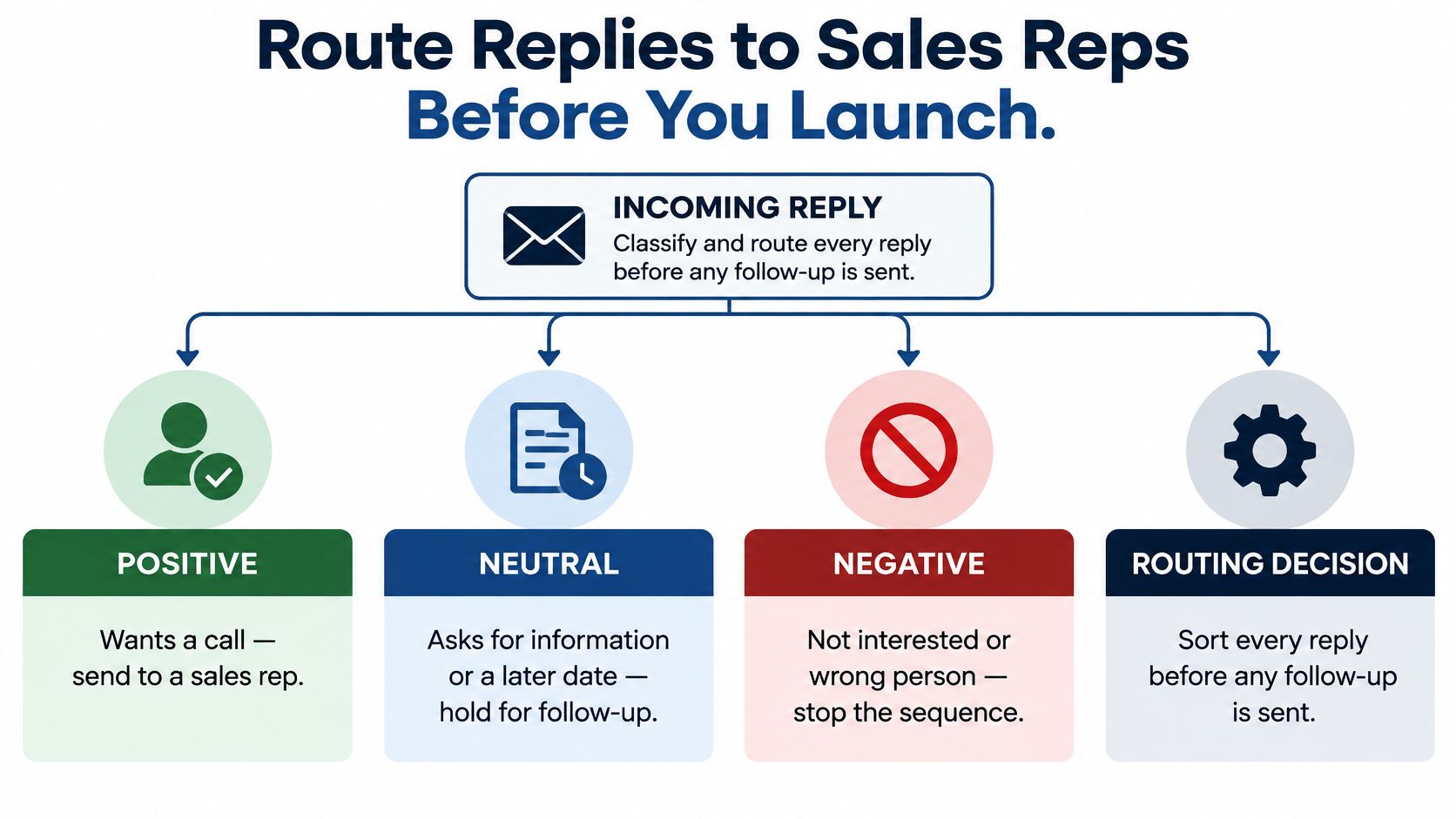
Define positive, neutral, negative, and unresponsive outcomes before activating the campaign. Positive means the prospect wants a call; neutral means they need information or a later date; negative includes not interested or wrong person; unresponsive means the full cadence ended without a reply.
Unresponsive isn't technically a reply type, so assign that status through sequence completion rather than an inbox classifier. Every actual reply should interrupt scheduled follow-ups before anyone decides what to send next.
Make the routing decision explicit for both automation and sales.
Give every outcome an owner
Stop the contact's sequence immediately.
Tag the outcome in the CRM and preserve the actual reply.
Assign positive replies to a named rep with the trigger, offer, previous emails, and exact question asked.
Schedule neutral replies for the date the prospect provided, or answer their information request.
Suppress negative and opt-out contacts across prospecting lists. A wrong-person response isn't permission to contact a replacement.
Review unresponsive contacts for eligible later nurture or retirement, rather than automatically restarting the same campaign.
A rep needs the full context to continue the conversation, not send another introduction. Include the resource promised, the applicable proof, and any qualification already established.
Our sales rep enablement training includes a reply playbook for classifying and actioning responses. The operating principle is straightforward: classification is incomplete until someone owns the next action.
Connect these decisions through sales pipeline automation, then test the handoff with sample replies before launch. Choose a single cadence and test variable, launch to a small eligible segment, and inspect deliverability daily during the first week.
Route replies first. Then launch small. More sends won't compensate for an interested prospect sitting in an unowned inbox.
The Social Search builds connected outbound systems covering buyer targeting, offers, sequences, sending infrastructure, and reply routing. Visit The Social Search and fill in the contact form to schedule a call about your outbound workflow; the team responds within 48 hours.
