Email Deliverability Audit: A Practical Playbook
Run a thorough email deliverability audit with this practical playbook covering authentication, reputation, content, and list hygiene for outbound programs.
A campaign can look healthy inside your sending platform while buyers barely see it. The messages show as delivered, the sequence is running, and the copy has been reviewed, yet replies fall sharply and prospects stop engaging. That's the point where rewriting the sequence is usually the wrong first move.
An email deliverability audit traces the failure from sending infrastructure to mailbox placement. If you run outbound through a platform such as Instantly, the platform can help manage sequences and sending operations, but it can't compensate for broken authentication, poor list hygiene, or a sender reputation problem. The audit needs to show which provider is filtering the mail, which signal changed, and what operational fix should come first.
Table of Contents
When You Actually Need an Email Deliverability Audit
A B2B outbound campaign can go quiet without any obvious delivery failure. The offer is unchanged, the account list looks familiar, and the sending platform reports successful delivery. Then a placement check shows Gmail accepting messages while Outlook routes a meaningful share away from the primary inbox. That pattern calls for an audit before anyone rewrites the sequence.
An email deliverability audit connects the operational change to the placement problem. It examines authentication, sender reputation, list quality, content signals, sending behavior, and provider-level results. The goal is to identify which provider is filtering the mail, which signal changed, and which fix should be prioritized first.
Triggers that justify a full audit
Start a full review when multiple indicators move together:
Reply rates fall without an intentional campaign change. Check placement and engagement before changing copy. A sudden decline can mean fewer messages are reaching visible inboxes, even when the ESP records delivery.
Seed tests show weak primary inbox placement. The benchmark recorded average inbox placement of 84.8%, with 6.1% of delivered messages going to spam and 9.1% missing entirely, according to Validity's 2026 Benchmark Report. If your results deteriorate against that baseline, compare providers and inspect the raw headers before changing campaigns.
Hard bounces rise above 2%. Treat that threshold as an audit trigger. Pause list expansion, isolate the affected source, and check stale records, validation controls, and sending configuration.
A mailbox provider changes enforcement. Gmail and Yahoo tightened bulk-sender requirements in February 2024. Recheck authentication alignment, complaint handling, and sending practices after any policy change, even if delivery has not yet dropped.
A weekly health check can track bounces, complaints, replies, and visible authentication failures. Escalate to a full audit when several metrics break together, one provider behaves differently, or the team changes its ESP, DNS, sending domain, templates, links, or volume. Each change can alter the signals providers use to classify mail.
Practical rule: Stop testing subject lines while provider-level placement is deteriorating. Fix the delivery path first.
Plan for access to DNS, ESP logs, mailbox-provider dashboards, raw message headers, seed inboxes, and campaign history. The harder part is usually coordination. Someone must identify every legitimate sender before the team tightens authentication policies or pauses a source. Treat the audit as an operational investigation, not a quick deliverability score.
For context on the commercial role of email in go-to-market systems, pair that strategic view with technical placement evidence.
Authentication and DNS as the First Control Check
Authentication comes first because reputation analysis is unreliable when the receiving provider can't establish who is authorized to send. Start with an inventory of every sending domain and subdomain, including marketing, transactional, sales, support, and third-party services.
Validate the records in dependency order
SPF is the first check. Confirm that every legitimate sending source is represented, that the domain has one authoritative SPF record, and that the record stays below the 10-DNS-lookup limit. Duplicate SPF records can trigger an immediate PermError, so consolidating records matters more than adding another include whenever a new tool is connected.
DKIM comes next. Verify that each active selector publishes the correct public key and that the signing service is using the same selector. Where possible, use 2048-bit DKIM keys or more, and check key rotation after an ESP migration or security change. A selector that changed in the provider console but not in DNS creates a failure that can look like a reputation problem.
DMARC ties the checks to the visible From domain. Start with p=none, collect aggregate rua XML reports for 30–60 days, validate every legitimate third-party sender, and then move toward p=quarantine and eventually p=reject. This staged approach exposes shadow senders without immediately blocking legitimate mail.
Review MX records and other email-related DNS entries as part of the same inventory. Old services, forgotten subdomains, and conflicting records create uncertainty during incident response. For campaign-level guidance that complements the technical checks, email content hygiene for campaigns is a useful supporting resource.
Authentication Records at a Glance
Record | Minimum Requirement | Common Failure | Quick Test |
|---|---|---|---|
SPF | All legitimate senders listed and fewer than 10 DNS lookups | Duplicate records or chained ESP includes | Review the published record and lookup count |
DKIM | Valid public key, active selector, and preferably a 2048-bit key | DNS key doesn't match the provider's selector | Inspect the raw header for a passing signature |
DMARC | Policy record, alignment, and aggregate reporting |
| Compare the From domain with SPF and DKIM alignment |
MX | Correct inbound mail routing | Legacy or incorrect mail hosts | Confirm the domain routes to authorized mail systems |
Send controlled messages to seed inboxes after each change. The raw headers should show spf=pass, dkim=pass, and dmarc=pass, but that result is only the authentication layer. A passing header doesn't guarantee primary inbox placement, so the next check must compare provider outcomes.
Teams building a cold-email system should also document the sending domains, ownership, and separation between traffic types. The operational principles in cold email infrastructure are relevant here because authentication becomes fragile when marketing, transactional, and internal traffic are mixed without clear control.
Sender Reputation Across Gmail, Outlook, and Yahoo
Sender reputation isn't a single domain-wide score. Gmail, Outlook, and Yahoo can assign very different outcomes to the same sender because each provider observes its own recipient behavior, complaint signals, traffic history, and authentication results.
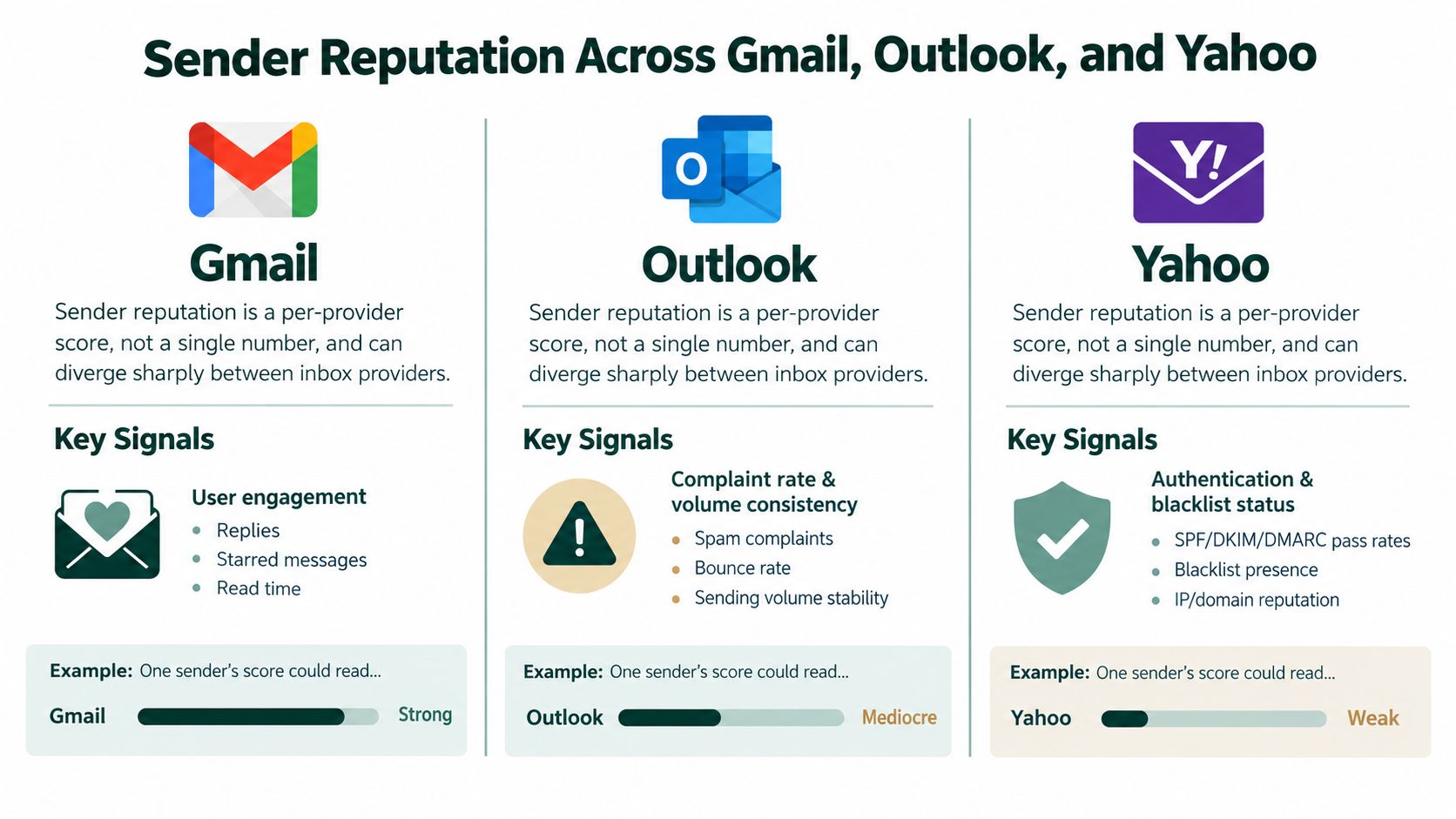
Gmail places substantial weight on recipient engagement, including replies, messages moved to primary, and other user actions, alongside domain and IP reputation visible through Postmaster Tools. Gmail's sender guidance says bulk senders should keep the spam rate below 0.3%, while the FAQ recommends aiming below 0.1% and avoiding 0.3% or higher. Since June 2024, senders above that level aren't eligible for mitigation, according to Gmail's sender guidelines.
Outlook deserves separate investigation rather than being treated as a proxy for Gmail. Its performance can diverge because of sender history, volume consistency, complaint data, and the behavior of a particular IP or sending stream. Yahoo has its own filtering and complaint signals, even though its bulk-sender expectations have moved closer to Gmail's authentication requirements.
What to pull before drawing a conclusion
Google Postmaster Tools: Review domain reputation, IP reputation, authentication, and spam-rate signals for the affected period.
Microsoft data: Compare available SNDS and complaint information with the ESP's delivery and bounce reports.
Seed placement: Test Gmail, Outlook, and Yahoo in the same run using identical content and sender settings.
Traffic history: Look for a new IP, a new subdomain, an abrupt volume change, or a previously inactive stream returning at scale.
The key is comparative diagnosis. If Gmail remains stable while Outlook deteriorates, a global copy rewrite is unlikely to solve the issue. Investigate the Outlook-facing IP history, sending pattern, recipient mix, and complaint behavior first. If every provider declines together, prioritize authentication, list quality, and the shared sending infrastructure.
A deliverability score can help a team communicate internally, but it shouldn't replace provider-level evidence. The useful question is not whether the domain has one acceptable score. It is which mailbox provider is rejecting, filtering, or deprioritizing the traffic, and what changed before that outcome. For a practical explanation of the underlying diagnostic approach, see email deliverability score.
List Hygiene and Engagement-Based Segmentation
List hygiene is an operating system, not a one-time export cleanup. A clean list protects reputation by preventing the ESP from repeatedly sending to addresses that have already failed, complained, unsubscribed, or stopped showing useful engagement.
Start with irreversible suppression. Hard bounces, spam complaints, and manual unsubscribes should never return to the active send pool through a synchronization error. Then separate addresses that are technically deliverable but operationally risky, such as role accounts, catch-all domains, disposable addresses, and recipients with prolonged inactivity.
Build the segments in the order the ESP uses them
Suppress hard bounces immediately. A hard-bounce rate above 2% should trigger investigation and suppression before another campaign runs. The issue may come from stale data, poor enrichment, or a broken validation step.
Suppress complaints and unsubscribes permanently. Don't rely on a campaign-level exclusion if the master audience can reintroduce those contacts.
Filter role and disposable addresses. Role accounts can produce low-quality engagement, while disposable domains can distort campaign results. Portreeve disposable email detection provides useful context for identifying that category.
Split recipients by recent engagement. Keep active recipients in the normal pool, place declining engagement into a controlled re-engagement segment, and move persistently inactive addresses into cold suppression according to a documented policy.
Complaint rates above 0.1% should be treated as a serious warning, with 0.3% representing the broader enforcement threshold used by major mailbox requirements, as outlined in Gmail and Yahoo deliverability requirements. The fix is usually suppression and targeting discipline, not a more aggressive follow-up sequence.
List Hygiene Thresholds and Suppression Actions
Signal | Threshold | Action |
|---|---|---|
Hard bounce | Above 2% | Pause the affected send, remove failed addresses, and audit data sources |
Spam complaints | Above 0.1% | Suppress complaint sources, inspect targeting and offer fit, and review consent |
Unsubscribe | Any confirmed request | Add the address to the global suppression list |
Disposable or role address | Detected during validation | Exclude from the active campaign unless there is a clear business reason |
Prolonged inactivity | Defined by the team's engagement policy | Re-engage once under controlled conditions, then suppress if there is no useful signal |
Verify the ESP honors those rules at send time. Check the final audience count, exclusion logs, synchronization timing, suppression precedence, and whether a CRM update can overwrite a global unsubscribe. Many list problems aren't caused by bad logic. They're caused by a correct segment that never reaches the final sending query.
Content and Sending Patterns That Quietly Tank Placement
Rewriting copy is an attractive fix because it feels immediate. It is also frequently misdiagnosed. If SPF, DKIM, DMARC, reputation, and list quality are weak, the mailbox provider may filter the message before the body has much influence. A cleaner email can't repair an authentication failure or a damaged sender history.
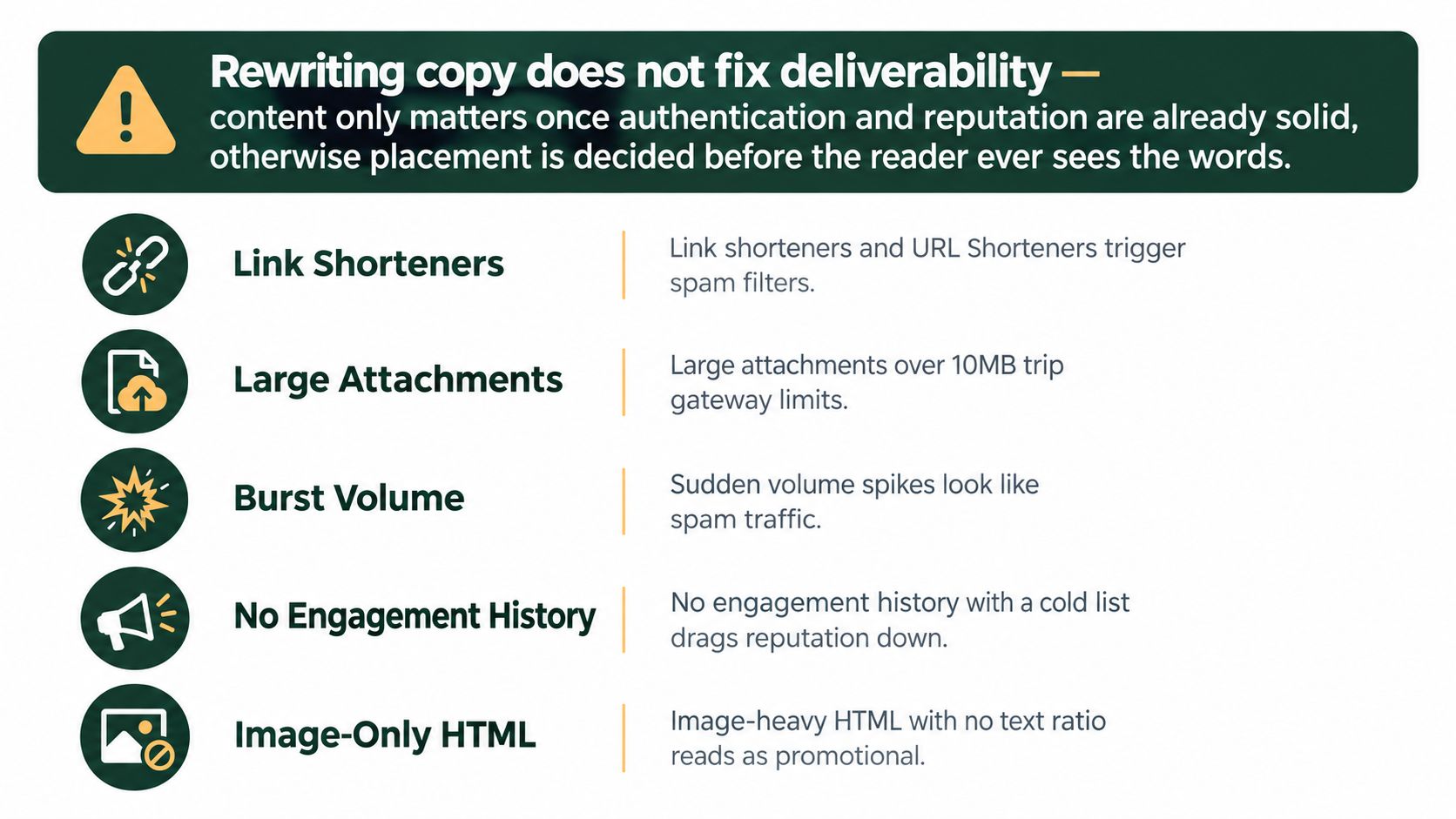
Content becomes a meaningful variable after the foundation is sound. Audit for image-heavy HTML, sparse text, newly registered or unfamiliar link domains, URL shorteners, attachment-only messages, and large blocks copied across campaigns. These patterns can resemble promotional or automated traffic, particularly when recipients have no positive engagement history with the sender.
Sending behavior often matters more than wording
A stable sending pattern gives mailbox providers a consistent history to evaluate. Abrupt volume increases, irregular campaign bursts, a new IP sending at full capacity, or a fresh domain carrying an established program's entire volume can all create risk.
Keep marketing, transactional, and internal traffic separated when their audiences and engagement patterns differ. A recipient who expects a password reset behaves differently from a prospect receiving cold outreach, and combining those signals makes diagnosis harder.
Run the same controlled content through Gmail, Outlook, and Yahoo after a change. Compare inbox, spam, and missing outcomes rather than relying on the ESP's delivered count. A copy edit without a seed test is a hypothesis, not evidence. The broader practical guidance in email deliverability best practices is useful only when paired with actual provider-level testing.
The right remediation depends on the pattern. If only one link domain correlates with filtering, replace or investigate that domain. If all content variants fail across providers, return to authentication and reputation. If placement is fine but replies remain weak, then messaging and offer fit deserve attention.
Metrics That Trigger a Re-Audit and How to Read Them
A single weak reporting period does not justify tearing apart your sending stack. The better split is between daily monitoring metrics and audit metrics that point to a real root cause.
Daily monitoring covers opens, replies, bounces, and complaints. Those numbers help spot movement fast, but they are easy to distort with tracking changes, audience mix, privacy features, or a small sample. Placement rate, sender reputation, domain reputation, IP reputation, and DMARC aggregate failures give stronger diagnostic evidence.
Read the metrics as a stack
Inbox placement is the outcome. Authentication shows whether the message is trusted. Reputation shows how the provider evaluates the sender. List quality and engagement show what recipients are signaling. Content and cadence help explain why one campaign may drift after the foundation looks fine.
A benchmark is useful only as context. In the same Validity benchmark report cited earlier, the global inbox placement average was reported at 84.8%, and a later 2026 benchmark said the 2025 global average had risen to 87.2%. The same report also identified Microsoft as the toughest major provider in its dataset, with 75.6% deliverability. Your own provider split still matters more than any global average.
Metric Triggers and Re-Audit Response
Metric | Trigger Threshold | Response |
|---|---|---|
Inbox placement | Materially below your provider baseline | Run seed tests across major providers and inspect authentication and reputation |
Hard bounce rate | Above 2% | Pause the affected audience, suppress failures, and audit data quality |
Spam complaint rate | Above 0.1% | Suppress complaint sources and review targeting, consent, and frequency |
Gmail spam rate | Approaching 0.3% | Reduce risk immediately, inspect Postmaster Tools, and address complaint drivers |
Reply rate | Sudden unexplained decline | Compare placement, audience mix, sending pattern, and message changes before rewriting |
DMARC aggregate failures | New or rising failure sources | Identify unauthorized or misaligned senders and validate legitimate services |
The first ten minutes of triage should stay mechanical:
Confirm whether the decline is isolated to one provider or spread across all providers.
Compare the latest send with the last stable send.
Check authentication results in raw headers.
Break out bounce and complaint movement by campaign, domain, and segment.
Look for a recent DNS, ESP, IP, template, link, or volume change.
Hold expansion until the most likely failure is isolated.
Use email marketing metrics for the reporting layer, but do not let a dashboard collapse placement, delivery, opens, and replies into one health number. Each metric answers a different operational question.
Remediation Priorities and a Repeatable Audit Cadence
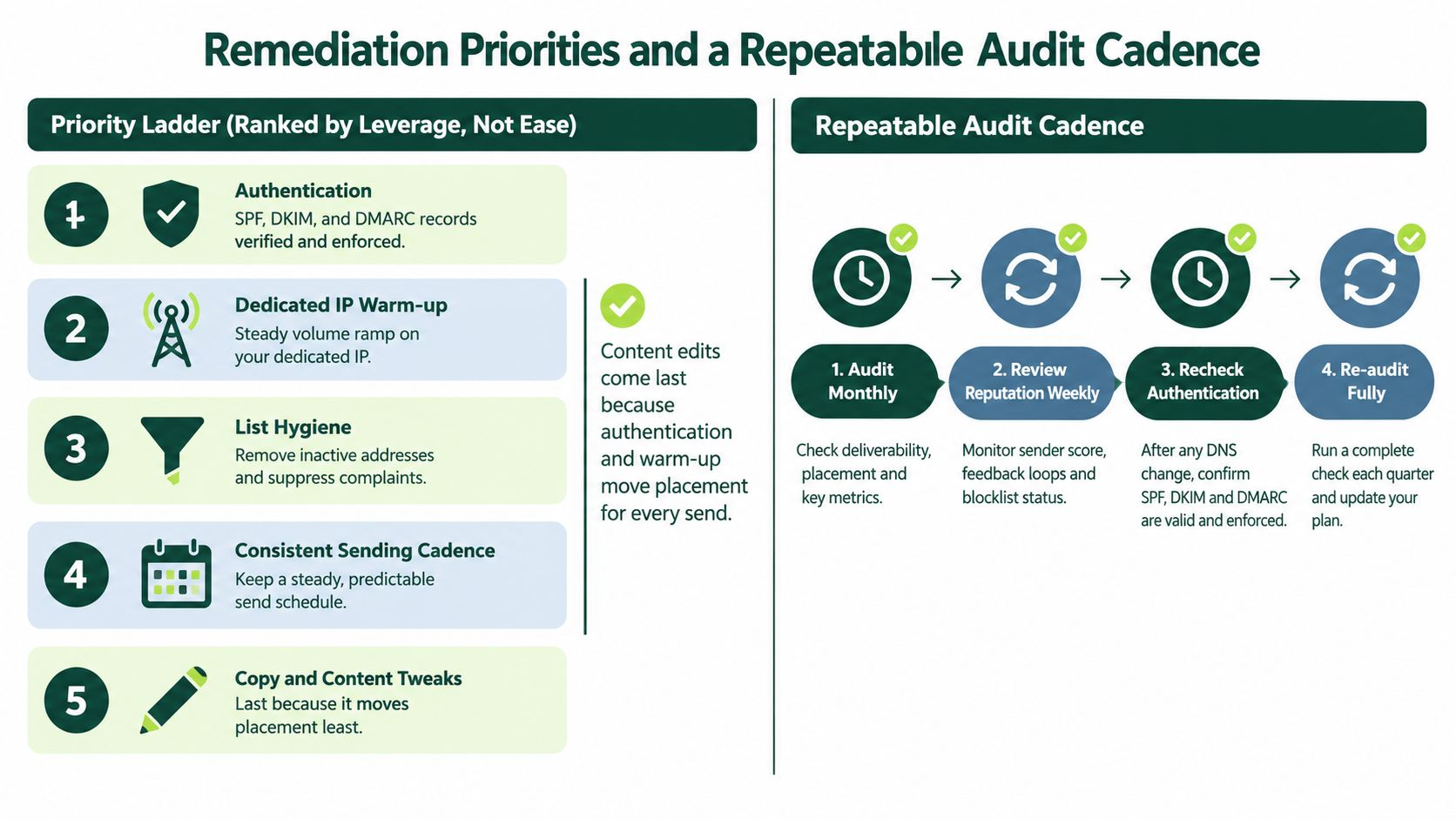
Fixes should be ranked by impact, not convenience. A subject-line rewrite is easy to assign, but authentication gaps and unstable sending infrastructure affect every message. Start with the control that can explain the widest failure pattern.
Prioritize the remediation sequence
Fix authentication. Resolve SPF lookup failures, duplicate records, DKIM selector problems, missing alignment, and unmanaged DMARC reporting.
Stabilize the sending stream. Separate traffic types, review IP or domain history, and avoid abrupt changes in volume or infrastructure.
Suppress risky recipients. Remove hard bounces, complaints, unsubscribes, disposable addresses, and persistently inactive contacts.
Restore a consistent cadence. Keep sending patterns predictable and make changes in controlled increments.
Tune content last. Review links, HTML structure, attachments, and copy only after the technical and reputation signals are stable.
A practical cadence combines continuous monitoring with trigger-based audits. Review bounce, complaint, and reply movement weekly. Recheck authentication and domain reputation monthly, and run a deeper infrastructure review after major changes to DNS, ESPs, domains, IPs, templates, or sending volume. A full re-audit should also begin when complaint rates exceed 0.1% or provider placement drops materially from its established baseline.
Deliverability isn't audited once and forgotten. The team monitors it continuously, audits it when a trigger appears, documents the fix, and repeats the same controlled test to confirm the outcome. That process prevents a temporary symptom from turning into a permanent sending problem.
The Social Search designs and operates outbound systems for B2B teams, connecting ICP definition, data, messaging, sending infrastructure, routing, and reporting. If your team needs an email deliverability audit tied to the wider outbound system, visit The Social Search to discuss the infrastructure, diagnostics, and operating process.
