How to Send a Cold Email That Gets Replies in 2026
Learn how to send a cold email in 2026 with proven templates, deliverability setup, sequencing tips, and reply-handling tactics built for B2B teams.
You've got a sequence sitting in a draft folder, a prospect list that looks large enough to feel reassuring, and a nagging sense that the message won't land. The inbox is crowded, the ICP is still fuzzy, and adding another clever subject line won't fix either problem.
Cold email works when the surrounding system works. You need the right account, a verified contact, a relevant business reason, authenticated sending infrastructure, a sequence that earns attention, and a process for handling the reply. The email itself is only one component.
For teams building that system, Instantly is a practical option for sending infrastructure, warming, sequencing, and reply management. The rest of the operating model still requires judgment. Tools can help you execute a decision, but they can't decide whether the recipient should receive the message in the first place.
Table of Contents
What You Are Actually Trying to Send
The message you send is a commercial communication, not merely a note to a stranger. That means the sender must be identifiable, the purpose must be clear, the subject must match the content, and the recipient must have a straightforward way to decline future messages.
In the United States, the CAN-SPAM Act of 2003 applies to commercial email, including business-to-business messages, and it doesn't exempt one-to-one outreach. The Federal Trade Commission's CAN-SPAM compliance guide requires truthful header information, non-deceptive subject lines, identification of the commercial nature of the message, a valid physical postal address, and a clear opt-out mechanism. An unsubscribe request must be honored within 10 business days, and the opt-out method must remain capable of processing requests for at least 30 days after sending. Each non-compliant email can carry a civil penalty of up to $53,088, so compliance belongs in the sending system, not in a final copy review.
The United Kingdom requires a different classification step. Under PECR guidance from the Information Commissioner's Office, unsolicited electronic marketing to individuals generally requires prior consent unless a narrowly defined soft opt-in applies. Sole traders and some partnerships can be treated as individuals, which means a work email address doesn't automatically make unrestricted cold outreach lawful. A global list should therefore record geography, legal entity, consent status, data source, and opt-out history before it enters a sequence.

Treat authentication as a prerequisite
Technical identity is separate from legal permission. SPF, DKIM, and DMARC help receiving systems verify that the message is associated with an authenticated sending domain, but authentication doesn't prove that the recipient expected your outreach or that the message is lawful.
Google's sender requirements for Gmail use approximately 5,000 messages to Gmail accounts within a 24-hour period as a practical bulk-sender threshold. Since February 2024, senders at that scale must authenticate outgoing email, avoid unwanted or unsolicited messages, and make unsubscribing easy. Google also recommends valid forward and reverse DNS records, along with SPF, DKIM, and DMARC. These requirements matter below the threshold too, because poor authentication, complaints, and stale data can damage sender reputation before a team becomes a formal bulk sender.
Your pre-flight check should be simple:
Sender identity: Confirm the representative, company, From domain, and postal address are accurate.
Message framing: Make sure the subject reflects the body and the commercial purpose is plain.
Recipient classification: Record country, legal entity, consent basis, data source, and suppression status.
Opt-out control: Test the unsubscribe path and ensure it continues processing requests after delivery.
DNS authentication: Verify SPF, DKIM, and DMARC before increasing volume.
Reply ownership: Decide who handles positive, ambiguous, referral, and opt-out responses.
Practical rule: Personalization can improve relevance, but it never replaces truthful identification, lawful processing, or a working opt-out.
The correct answer to “how to send a cold email” starts before the first sentence. It starts with deciding whether the contact belongs in the audience, whether your infrastructure can be trusted, and whether the recipient can decline without friction.
Building the ICP and the List That Actually Replies
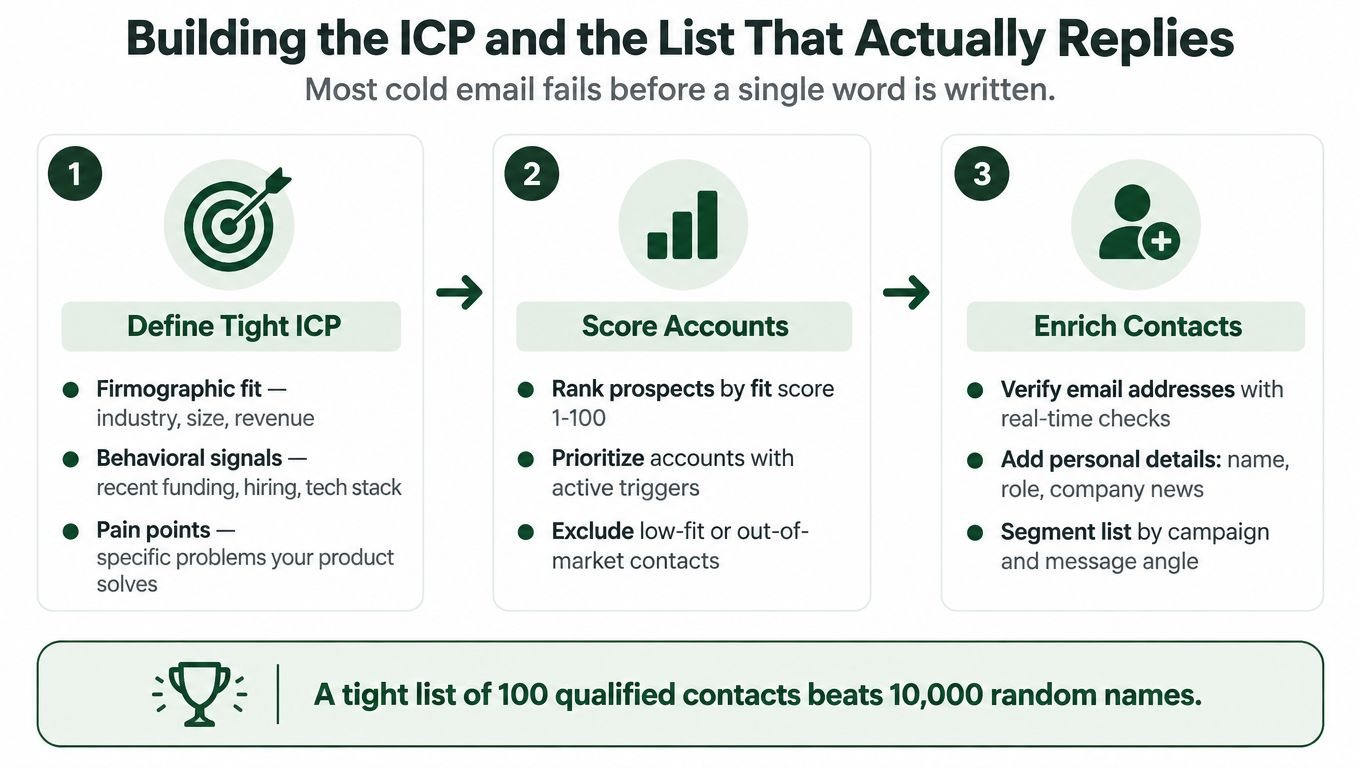
Most weak campaigns fail before copywriting begins. A broad list forces the message to become vague, while stale data creates false personalization and unnecessary bounces.
Define the ICP using two filters. Firmographic fit includes the industry, company size, market, business model, and operational context that make your offer plausible. Signal fit asks whether something is happening now, such as hiring, a product launch, a funding event, a technology change, or a visible operational problem. A company can match the firmographic profile and still be a poor prospect this quarter.
Score accounts before enriching every contact. A simple internal score can combine fit, signal strength, role relevance, and data confidence. The score isn't valuable because it looks precise. It's valuable because it forces the team to explain why an account is being prioritized and which accounts should be excluded.
Build evidence into each row
Use Apollo to enrich firmographics, identify relevant contacts, and add context that can be checked before sending. Use Whitewhale when intent signals can help distinguish a theoretically suitable account from one showing current buying activity.
The output shouldn't be a spreadsheet full of names. Each account should have an observation a buyer would recognize as true, such as a new hiring pattern, a market expansion, a change in the technology stack, or a process likely to create the problem you solve. If you can't write that observation without guessing, the account isn't ready.
For teams that need human capacity to research and qualify accounts, a LATAM SDR recruitment agency can be a useful resource when building regional prospecting coverage. The operating question remains the same: can the representative validate why each contact belongs in the sequence?
A verified list should also be segmented by persona and message angle. A revenue leader, operations owner, and technical buyer may work at the same company, but they won't describe the problem in the same language. Keep the segment narrow enough that one observation and one outcome can make sense across the group.
A practical lead generation and list-building workflow should leave you with clean suppression rules, verified addresses, account ownership, and a clear reason for every contact. A smaller relevant list is more useful than a large scraped list because it gives the message somewhere specific to go.
Writing the Message a Real Buyer Will Read
Your first email has one job: create a credible reason to reply. It doesn't need to explain the product, prove every capability, or force a calendar decision.
The practical structure is short plain text, with the sender identified near the beginning, one relevant observation, one outcome-oriented value line, and one low-friction question. In the empirical analysis of 5,187 cold emails, the average response rate was 15%, while messages under 150 words combined with an early sender introduction reportedly increased response from 17% to 44%. Basic personalization using the recipient's name, company, and location reportedly reached 58% for one buyer segment. The published analysis makes clear that these are experiment-specific figures, not universal benchmarks.

Use a structure you can test
Subject: Make the topic accurate and restrained. “Question about your outbound hiring” is clearer than “Pipeline growth.”
Opening: Start with the verified observation, not “Hope you're well.” Mention a relevant trigger, operational change, or problem the buyer is likely to recognize.
Value line: Explain the outcome in one sentence. “We help APAC SaaS teams turn signal-based account lists into managed email and LinkedIn sequences” is more useful than a feature catalogue.
CTA: Ask a question that can be answered without opening a calendar. “Is improving reply quality a priority this quarter?” creates less friction than an immediate meeting request.
The first email should open a conversation, not deliver your entire sales presentation.
A reusable pattern might look like this:
Subject: Question about [verified trigger]
Hi [Name],
I noticed [specific observation]. Teams in that position often run into [relevant problem]. We help [specific segment] improve [business outcome] by [brief mechanism].
Is [problem] currently a priority for you, or is someone else closer to it?
[Name]
Keep every claim accurate. Don't manufacture a customer result, imply a relationship that doesn't exist, or add personal details that feel intrusive. The SDR email templates that stop the void can provide structural inspiration, but the final message still needs account-specific evidence.
Test one component at a time across matched segments. Start with the CTA or opening observation, because those usually reveal more about relevance than a subject-line change alone. The guide to cold email length is useful when a draft keeps expanding beyond what a busy buyer can scan quickly.
Sequencing, Follow-Ups, and the Channel Mix Around Email
A first message rarely carries the whole campaign. Good sequencing gives the prospect several relevant ways to recognize the problem without repeating the same pitch.
A practical sequence uses three to five touches over two to three weeks, with each message adding a different angle. The first email introduces the observation. A later touch can clarify the operational consequence, share a relevant insight, ask a diagnostic question, or close the loop. “Just checking in” adds no reason to respond.
Use a new channel when it improves context, not because email was ignored. A LinkedIn touch can reinforce identity or create a lighter interaction, particularly when the buyer is active there. HeyReach can support LinkedIn outreach and automation, but automation still needs account-level suppression so a reply or opt-out stops activity across channels.
A sequence should have explicit stop conditions:
Clear no: Suppress the contact and record the reason.
Referral: Route the introduction, then stop contacting the original person unless they invite further discussion.
Opt-out: Suppress immediately across every relevant list and channel.
No engagement: End the sequence after the defined touch limit instead of recycling the contact indefinitely.
Negative signals: Pause the segment when replies are confused, hostile, or predominantly irrelevant.
Use the follow-up email guide to design the timing and role of each touch, but don't confuse persistence with pressure.
Judge each variant by positive-reply rate, qualified conversations, and meetings. Open rates can be noisy, and a high reply rate isn't useful when most responses are objections, confusion, or unsubscribe requests. Test one variable per matched segment, document the change, and retain a winner only when downstream quality improves.
Deliverability as a Monitored System, Not a One-Time Setup
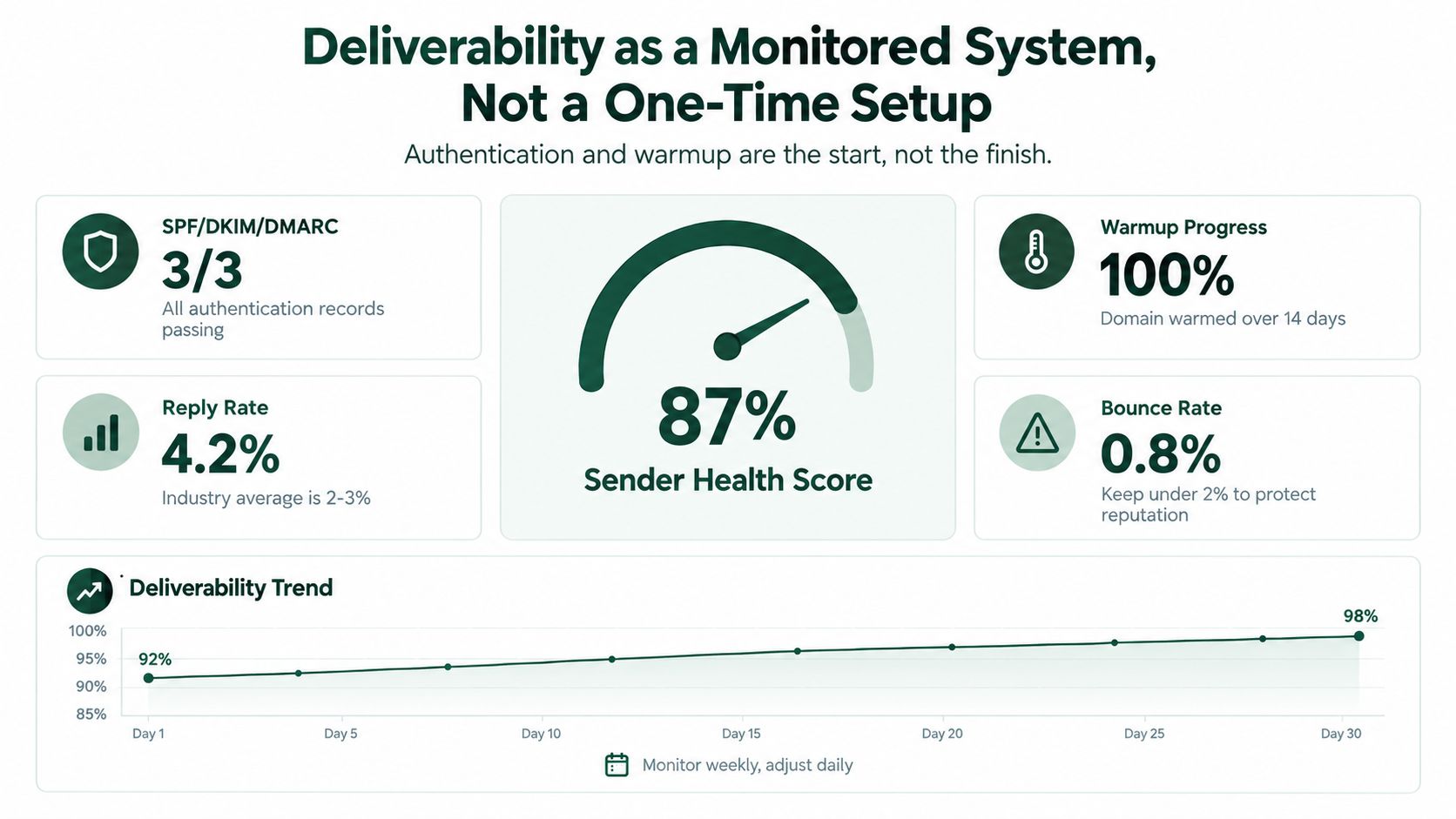
Authentication and warming establish the baseline. A campaign can still generate replies while weakening the domains and mailboxes needed for future outreach, so deliverability belongs in the operating dashboard.
Track authentication success, bounces, spam complaints, unsubscribes, domain reputation, and replies as separate signals. Google's Postmaster guidance states that correctly configured DKIM and DMARC commonly reach at least 95% authentication success. SPF can be lower when third-party senders are involved. Treat that figure as a technical reference, not proof that messages will reach the inbox.
Start with a small, relevant audience. Verify addresses, remove invalid contacts, and raise volume gradually. A sending coordinator such as Instantly can organise mailboxes and sequences, but it cannot compensate for weak targeting or poor list hygiene.
Know when to slow down
Pause a mailbox when bounces or complaints increase, seed tests show unexpected placement changes, or replies become unusually negative. Add a sending domain only for a legitimate operational reason, such as infrastructure that cannot safely support the audience. More domains will not repair bad data.
Benchmarks vary because studies count different populations and define responses differently. One analysis of 5,187 emails reported a 15% average response rate. Another compilation cited a 0.48% median and a 16.3% top-5% reply rate across 65 million emails. The Gmail deliverability guidance cites cold-email reply rates declining from 6.8% in 2023 to 5.8% in 2024, roughly a 15% decrease. Use these figures for context, not as universal targets.
Send more carefully before you send more volume.
Maintain a weekly view by domain, mailbox, segment, message version, and sequence step, following these email deliverability best practices. The 2026 guide to inbox placement offers further troubleshooting context. The operating loop is simple: detect a signal, pause the affected asset, fix the cause, and resume only after conditions improve.
Handling the Reply, Not Just Getting One
A reply is not a single conversion event. “Send details,” “not now,” “copy my colleague,” and a direct buying question each require a different response. Treating them all as permission for another generic follow-up wastes the strongest signal the campaign has produced.
Define reply tags before launch, then route each response to an owner. A direct question deserves a direct answer. A request for details needs a short, relevant explanation rather than a brochure dump. “Not now” should become a permission-based nurture path with a recorded reason and a future trigger, not an endless series of reminders.
Reply Pattern | What It Signals | Best Next Action |
|---|---|---|
Direct question | The prospect has a specific information gap | Answer the question plainly, then ask one relevant diagnostic question |
“Send details” | Interest exists, but the buyer wants lower-commitment information | Send a concise, tailored summary and offer a simple choice for next steps |
“Not now” | Timing or priority is weak | Ask whether a future trigger matters, then suppress or nurture with permission |
Referral to a colleague | Another person owns the problem or decision | Thank the sender, contact the referral with context, and stop duplicate outreach |
Objection | The offer, timing, or fit is unclear | Address the stated issue once, then let the prospect choose whether to continue |
Silence | No observable buying signal | Complete the sequence, send a graceful close, and suppress until new evidence appears |
Measure reply-to-qualified-conversation and reply-to-meeting by segment, persona, signal, and message. A campaign can have plenty of replies and still produce weak pipeline if the responses don't represent a real problem or reach the right stakeholder.
The sales pipeline reporting framework should connect the original signal and message to the eventual conversation. That makes reply handling part of revenue operations instead of leaving it as an inbox habit.
Several teammates contacting the same account creates another risk. Share suppression status, referral notes, and ownership across the team so an ambiguous reply doesn't trigger parallel pressure from multiple senders. Trust is account-level, not mailbox-level.
The Weekly Operating Loop That Keeps It Working
Cold email performance changes as data, infrastructure, and buyer signals change. A weekly operating loop keeps list quality, message quality, sending health, and reply handling connected.
Review technical health first. Check authentication, bounce activity, complaints, unsubscribe processing, and reputation by domain and mailbox. Then examine positive replies by segment, persona, signal, message version, and sequence step. Retire variants that create poor-fit conversations, even when their total reply count looks attractive.
Refresh the list using current evidence. Remove stale contacts, add relevant triggers, recheck account ownership, and confirm that the legal classification still permits outreach in each market. APAC expansion needs region-aware segmentation. Geography, seniority, time zones, and communication conventions can change how a buyer reads the same CTA.
Use the weekly meeting to make operating decisions:
Infrastructure: Which mailbox or domain needs a pause, repair, or closer monitoring?
Audience: Which segment has enough evidence to continue, and which needs tighter qualification?
Message: Which CTA, opening, or offer variable will be tested next?
Routing: Are positive, ambiguous, referral, and opt-out replies tagged consistently?
Reporting: Can the team connect meetings and pipeline to a specific signal, list, and message using the sales pipeline reporting framework?
Document decisions where the team can find them. A shared operating record survives staff changes better than a folder of templates and gives a fractional GTM lead, SDR, or founder a common way to choose the next change. The aim is continuous learning while protecting infrastructure and recipient experience.
Each week, confirm SPF, DKIM, and DMARC, tighten one ICP segment, rewrite one CTA, define reply tags, and block a 30-minute review. Those actions improve the system more reliably than another hour polishing a subject line.
The Social Search designs and runs outbound systems connecting ICP definition, signal-ranked data, messaging, sending infrastructure, reply routing, and reporting for B2B teams selling into APAC and global markets. If cold email is not producing qualified conversations, visit The Social Search to discuss a system build or embedded GTM support.
