Email Sequence Strategy That Gets Replies and Meetings
Email sequence strategy step by step: pick your ICP, write one hypothesis per touch, set cadence and triggers, and track replies and meetings.
In 2025, follow-up emails collectively generated 58.6% of all replies in Belkins' analysis of 7,530,489 cold emails. That figure reframes Email Sequence Strategy completely. Your first email isn't the campaign, it's the opening test in a controlled experiment. If delivery is broken, though, follow-ups don't create more reach. They create more risk, more complaints, and more damage to domains you'll need next month.
Table of Contents
What a Working Email Sequence Looks Like
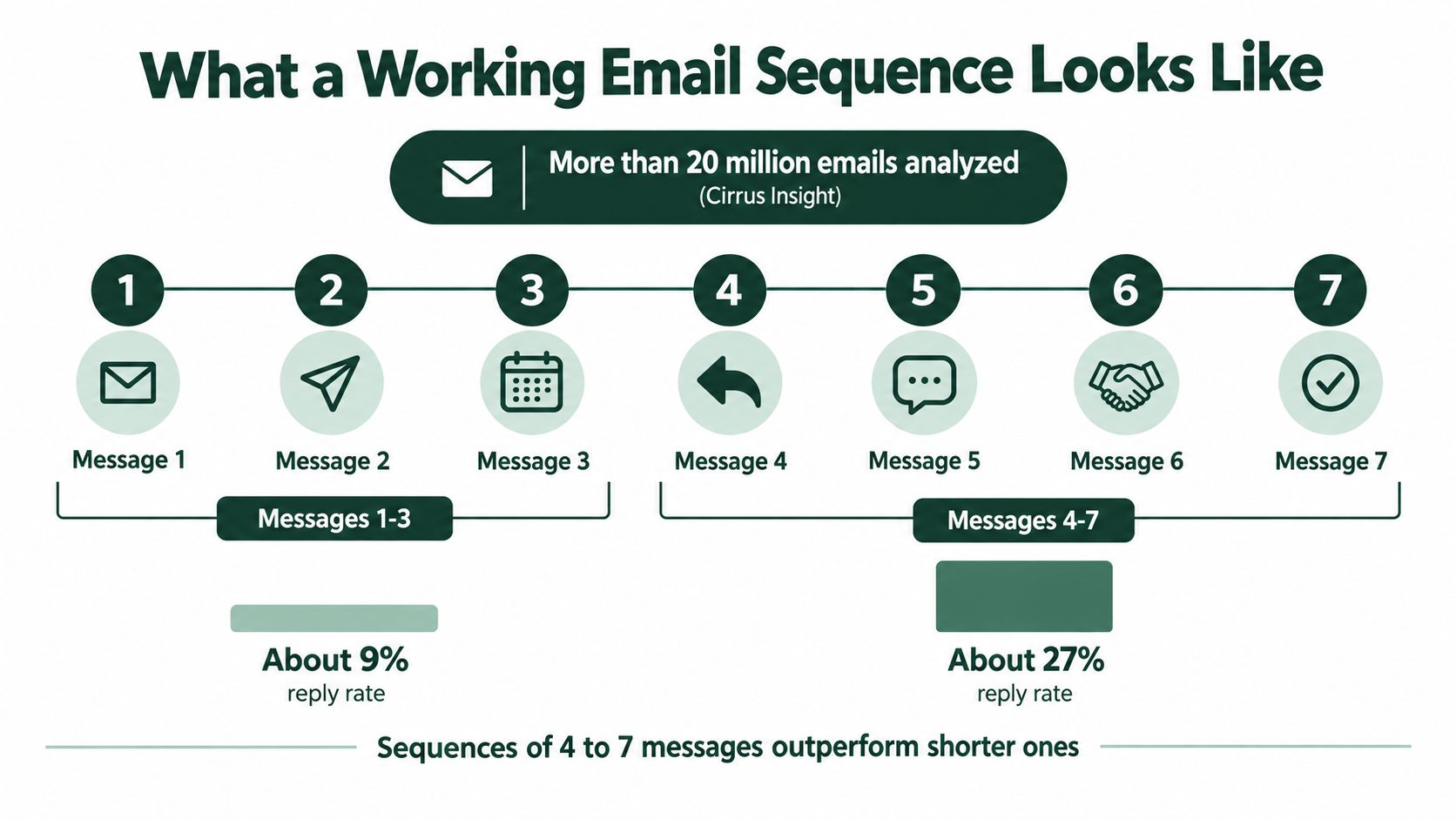
An analysis cited by Cirrus Insight of more than 20 million cold emails found that sequences containing 4 to 7 messages achieved an approximately 27% reply rate, compared with about 9% for sequences containing only 1 to 3 messages, according to OutSales' summary of sales follow-up statistics. That is roughly a threefold difference, and it is why a single outbound message is rarely a fair test. The same analysis also sets a ceiling. Extending a sequence to ten emails reduced reply rates to roughly 3%, so length has an optimum, and pushing past it costs you.
I would start with five touches. That is long enough to test several reasons to reply and short enough to stop before persistence turns into fatigue. Each touch needs a distinct job, because five versions of "just checking in" will not teach you anything or earn replies. If you want the wider case for sequencing inside a B2B program, start with why email marketing matters for pipeline before you judge any single message on its own.
Default Five Touch Cadence
Touch | Day | Channel | Job of the touch |
|---|---|---|---|
1 | Day 0 | State one specific hypothesis about the prospect's problem | |
2 | Day 3 | Add a proof point, such as a result from a similar account | |
3 | Day 6 | Email or LinkedIn | Change the angle or the offer |
4 | Day 10 | Ask a short yes-or-no question or share one resource | |
5 | Day 16 | Give a final, relevant reason to reply, then close the loop |
The tight early spacing reflects how fast reads and replies happen. Replies to a first email usually come soon after it is opened, so you don't need to wait a week to learn whether touch one landed. What you need is a second, different reason to reply while the problem is still fresh, then wider gaps so the sequence doesn't feel like a machine tapping the same person on the shoulder.
One caveat before you extend past five. If inbox placement is weak, extra touches add complaints rather than reach, and the reply data gets harder to read. Check delivery first. When bounces and spam placement are clean but replies stay flat, the problem sits in your copy and hypotheses. When placement is broken, fix that upstream before you debug anything downstream.
Where the System Lives
Run the cadence, stop rules, and mailbox rotation in one place rather than in spreadsheets and inboxes. I recommend Instantly for sequencing and sending because the stop-on-reply logic, daily limits, and per-touch reporting sit together, which makes debugging far easier. If touch three moves to LinkedIn for prospects with an active profile, HeyReach can run that step without a rep manually chasing connection requests. Whichever stack you choose, the rule is the same. One system owns the sequence state for every prospect.
Practical rule: Measure the sequence, not the first email. Reply rate, positive-reply rate, meetings, and unsubscribes by touch tell you what to fix. A single send tells you almost nothing.
Teams that manage nurture flows alongside cold outbound need the same discipline in both places. The resources on how to automate your prospect follow-up emails are useful here because they treat follow-ups as planned steps with a purpose, not as reminders bolted on later. Before you write any copy, reduce each of the five touches to one hypothesis sentence. If you can't state the hypothesis in a sentence, the email will wander, and the reply data won't tell you which idea failed.
Map Your ICP and Split Prospects Into Segments
A segment is only useful if you can write a different hypothesis for it. Start by defining your ideal customer profile in four fields, and be strict about each one. Vague fields produce vague segments, and vague segments produce the generic copy that gets ignored. If you need a fuller worksheet, work through how to define an ideal customer profile and fill every field before you build a list.
Firm profile: Industry, headcount band, and funding stage or revenue range. A 40-person firm and a 400-person firm don't buy the same way, even in the same industry.
Buying role: Economic buyer, champion, or operator. The person who signs, the person who wants the change, and the person who'll run it need different messages.
Market: Country or region, including whether the target is APAC or global. Language, sending norms, and consent rules change by market.
Trigger: Hiring for SDRs, a recent funding round, a new market entry, or a leadership change. A trigger gives you a reason to write now instead of eventually.
Score Fit and Cut Ruthlessly
Score each account 1 to 3 on fit across those fields. Tier 1 accounts match on nearly everything and carry a live trigger. Tier 2 accounts match on firm profile and role but lack a clear signal. Tier 3 accounts are a stretch on size, market, or role, and I'd drop them from sequences altogether rather than pad volume with weak fit.
Weak-fit volume is expensive. It dilutes reply rate, raises complaints, and hides whether your message works for the accounts you want most. A smaller list you can describe precisely will outperform a large list you can't.
Build Segments You Can Write For
Combine the fields into segments you can name in one line. A workable example is a Series A SaaS company in Singapore where the VP Sales is the buyer. Another is a mid-market logistics firm expanding across APAC where the Head of Sales owns pipeline. If two segments would receive the same email word for word, merge them. If one segment needs two different hypotheses, split it.
Say a 200-person logistics firm announces an APAC expansion, and a 40-person agency hires its first sales lead. The job titles on your list might match. The buying problem doesn't. The logistics firm is worried about coverage in new markets, the agency is worried about founder-led sales stalling, and one sequence can't speak to both without going bland.
Use Apollo to enrich each contact with title, headcount, location, and technology signals, then verify addresses before you load anything into a sending tool. Mark missing fields as unknown rather than guessing. Personalization built on wrong data does more damage than none, because the prospect can see you didn't check. For a first pilot, three to five segments is a workable size, enough to compare results without fragmenting your volume into noise.
Write One Hypothesis Per Touch
Write the hypothesis before the email. For each touch, name the segment, the likely problem, the observable signal that suggests it, and the proof or offer that should earn a reply. One sentence per touch, kept in a doc next to the sequence. That doc is what turns the sequence into a controlled experiment: every email tests one claim, and every reply or silence is a result you can read against it.

Why Follow Ups Carry the Weight
Apollo's summary of research, citing Yesware and Peak Sales Recruiting, reports that 44% of salespeople stop after only one follow-up, and that roughly 70% of responses come from the second through fourth emails in a sequence. Silence after touch one usually signals bad timing or an unclear problem, and rejection is rarely the story this early.
Those numbers only hold if the emails really arrive. A follow-up that lands in spam never ran the test at all. When replies stay flat across every touch, check inbox placement before you conclude the messaging is wrong. If placement is weak, each added follow-up raises complaint and filtering risk without adding reach, so delivery is the constraint to fix first.
The numbers don't justify twelve identical emails either. They justify a finite, varied sequence where each step changes the angle, the proof point, the call to action, or the channel. Change exactly one major element per touch so you can attribute the outcome. If touch three changes the claim, the proof, and the CTA at once, a reply tells you something worked without telling you what.
A follow-up that repeats the first email in shorter words just runs the same test twice, and it'll return the same result.
A Worked Example
Take a Series A SaaS firm hiring its first SDR. Touch one names the hiring gap directly and asks how pipeline coverage works while the role sits empty. Touch two adds a result from a similar team at the same stage, so the claim has evidence behind it. Touch three swaps the meeting request for a short benchmark teardown of their outbound motion, which lowers the cost of saying yes. Touch four asks a plain question about whether the problem is still open this quarter. Touch five says you're closing the thread and leaves a clear door if timing changes.
Each email tests a different reason to respond, and the sequence gets easier to answer as it goes. You can adapt the structure from these B2B sales email templates, but rewrite the opening claim for your segment rather than sending the template as written.
Keep each email under 90 words. Use plain subject lines that name the topic without tricks, and never open two emails in a row with the same phrase, because repeated openers are the fastest tell that a sequence is automated. One idea, one proof point at most, one ask. If a draft needs a second paragraph to explain the first, the hypothesis underneath it isn't clear yet, so fix the sentence before you fix the copy.
Set Up Sending Infrastructure Before Your First Send
Deliverability is the upstream constraint on everything else in your Email Sequence Strategy. If mail lands in spam or never arrives, your reply rate measures filtering, not messaging. Validity's 2025 benchmark found that only 85.0% of legitimate marketing email reached the inbox, with 5.6% landing in spam and 9.4% missing entirely, according to Validity's 2025 email deliverability benchmark report. When results are weak, check placement before you rewrite subject lines.

Authenticate Every Domain
Set up SPF, DKIM, and DMARC on every sending domain, and make sure the From domain aligns with either the SPF or DKIM domain. Since February 2024, senders sending 5,000 or more messages per day to Gmail accounts must meet enhanced requirements, including SPF and DKIM authentication, a DMARC policy, domain alignment, and one-click unsubscribe, as Gmail's sender guidelines set out. Spreading volume across mailboxes doesn't dodge this. The requirement applies to your whole sending infrastructure, so every domain needs the same treatment. For a deeper build guide, work through the steps for cold email infrastructure before your first campaign loads.
Separate Domains and Warm Slowly
Keep cold outreach on separate domains from your main brand domain, so a testing mistake doesn't damage the domain your invoices and customer mail depend on. Spread volume across mailboxes and warm each new mailbox for two to three weeks before it carries full volume. In week one, hold each mailbox to around 10 to 20 messages a day, and raise the limit only while complaints and bounces stay flat. A slow ramp feels tedious. Rebuilding burned domains feels worse.
Clean the list through verification before import, and remove role addresses such as info@ or sales@, which rarely belong to a buyer and often bounce or trigger complaints. The mechanics of cleaning and monitoring are covered well in guidance on how to improve inbox placement with list hygiene, and the habit matters more than the tool. Check the list every time, not just at launch.
Consent and identification rules differ between countries, so check the requirements for each target market before you send. A sequence built for the United States may need a different consent basis in Australia or parts of Europe. Don't assume one market's rules travel.
Pre Launch Checklist
Domains authenticated: SPF, DKIM, and DMARC passing on every sending domain, with alignment confirmed.
Unsubscribe working: Tested end to end, including suppression across all mailboxes.
Mailboxes warmed: Two to three weeks of warm-up completed at low, stable volume.
Lists verified: Invalid and role addresses removed before import.
Stop rules loaded: Reply, bounce, and opt-out handling active before the first send.
Set Timing, Triggers and Exit Rules
Spacing comes first. Send touch one on Day 0, touch two on Day 3, touch three on Day 6, touch four on Day 10, and touch five on Day 16, matching the cadence table. The gaps widen from three to six calendar days, which keeps early momentum without making the sequence feel automated. Send in the recipient's local morning and skip weekends, because a Saturday follow-up announces itself as a machine. For the reasoning behind each gap, the follow-up guide on templates and timing walks through it touch by touch.
Timing is one variable in the experiment, and it sits downstream of delivery. If touch one never reached an inbox, the four touches behind it add exposure risk without adding reach, no matter how cleanly they are spaced. You can tell the two failure modes apart in the results. Silence across all five touches usually means the messages never landed, while replies on early touches that dry up later point at weak hypotheses further down the sequence, and the fix there is rewriting rather than respacing.
Triggers Start Sequences
A trigger is an event that justifies starting or restarting outreach. A job posting for an SDR, a funding announcement, a new country launch, or a new executive in the buying role all qualify. Intent-signal tools such as Whitewhale can surface these events so a rep isn't manually watching hundreds of accounts. Each trigger starts a fresh touch one with its own hypothesis, because the event is the reason you're writing.
Routing rule: A trigger earns a new sequence. It doesn't earn a bump on a dead thread, and prospects can tell the difference in one line.
Cadence design also covers channels beyond email. When LinkedIn touches sit between sends, MakeAutomation's guide to sales cadences covers the main spacing and channel-order options.
Exit Rules Are Not Optional
Stop immediately on any reply. Every later touch must cancel the moment a prospect responds, whatever they say.
Route positive and ambiguous replies to a human the same business day. Speed matters more than polish at this point.
Pause on out-of-office replies rather than stopping, and resume after the stated return date.
Suppress hard bounces and unsubscribes across every mailbox and list, not just the next scheduled step.
Recycle nonresponders after 60 to 90 days only when a new signal appears, and write that rule into the playbook.
Exit rules are the boundaries that keep the experiment controlled. Without them, a sequence keeps spending sender reputation on prospects who already answered the question.
The suppression rule carries legal weight. Under the U.S. CAN-SPAM Act, senders must honor an opt-out request within 10 business days, and the opt-out mechanism must remain capable of processing requests for at least 30 days after the message is sent, according to the FTC's CAN-SPAM compliance guide for businesses. I'd treat ten business days as the outer legal limit and nothing more. Suppression should be immediate and global, because one follow-up sent after an opt-out can cost you the domain it came from.
Launch a Two-Week Pilot Before Scaling
Run your first sequence as a pilot on one segment with one or two mailboxes, using the five-touch cadence. The mailboxes should already be warmed under the two-to-three-week rule, so the pilot starts at its low daily limit rather than doubling as a warm-up. One segment, one hypothesis set, one scorecard. That is a test you can read.
The Sixteen Days
The fifth touch goes out on day sixteen, so the pilot window runs a few days past two weeks to capture the full cadence.
Day one: Pick the segment, write the five hypotheses, and confirm the pre-launch checklist item by item.
Days two to three: Load verified contacts and test authentication, unsubscribe, and stop rules end to end with a test send.
Days four to nine: Send at the low daily count, reviewing complaints, bounces, and authentication failures every morning, and pause the segment if any threshold is crossed.
Day ten: Take the first read on touches one through four only. Score positive replies and meetings by touch, and note which hypothesis produced the first real conversation.
Days eleven to sixteen: Hold every variable constant while touch five sends, then score it against the earlier touches.
After day sixteen: Change one variable in the weakest touch and run the second cycle.
Know your pause thresholds before the first send goes out. Gmail states that senders should keep user-reported spam rates below 0.1% and prevent them from reaching 0.3% or higher, as Gmail's guidance on preventing spam flags explains. Complaints climbing toward that line mean a delivery and targeting problem, and more follow-ups will raise complaint volume without adding reach. Pause, check list quality and segment fit, and fix the cause before you touch the copy.
Decide What Scaling Requires
Expand to a second segment only once the pilot produces positive replies you can attribute to a specific signal and message. If you cannot say which segment, trigger, and touch created the conversation, you have noise rather than a winner. Score the pilot on positive replies, qualified meetings, unsubscribes, bounces, and complaints. Treat opens as a weak signal at best, because privacy features and automated scanning make them unreliable as the metric you optimize toward.
A quick way to tell delivery trouble from messaging trouble: steady inbox placement with flat replies points at the copy, while rising complaints and bounces point at the list. Fix the upstream problem first.
Keep the playbook and the suppression list in your own hands. Document the segments, hypotheses, thresholds, and exit rules so the sequence keeps working when the people who built it leave, whether it was built in-house or with an outside partner. A sequence that lives in one person's head is a habit with a sending tool attached, and habits do not survive a handover.
If you'd rather have this built as a system you own, The Social Search designs and runs outbound programs that connect ICP definition, data, messaging, and sending infrastructure into qualified pipeline for B2B teams selling into APAC and global markets. We can build your sequences, deliverability setup, and reporting as a documented playbook your team keeps, or operate it as an embedded fractional GTM function. Visit The Social Search to see how a pilot like the one above would run for your segments.
