LinkedIn Outreach Automation Tools Compared for 2026
Compare the best LinkedIn outreach automation tools for 2026. Features, deliverability, compliance, pricing, and APAC use cases evaluated side by side.
The popular advice is to pick the LinkedIn outreach automation tool with the most features, the cleverest AI copy, or the lowest monthly price. That advice is incomplete. A tool that sends more messages but leaves a regional sales team exposed to account restrictions, disconnected CRM records, and browser-dependent operations isn't a growth system. It's a fragile dependency.
For B2B teams selling across APAC, the key question is whether the system can preserve account continuity, route prospects from buying signals into relevant sequences, and support distributed operators without turning every campaign into a manual maintenance task. LinkedIn can be a valuable channel, but it should be engineered as part of outbound infrastructure, not treated as a faster broadcast mechanism.
The benchmark data explains why the category has become so important. A large study covering 15M+ contacts found an average LinkedIn connection rate of 26% and an overall reply rate of 7.2%, with performance changing materially by industry, seniority, and campaign type (Belkins' LinkedIn outreach study). The tool matters, but the surrounding system matters more.
Table of Contents
Why Most LinkedIn Automation Comparisons Miss the Point
Most comparison pages still rank LinkedIn outreach automation tools by feature count. They list visual sequence builders, AI personalization, CRM integrations, analytics, and pricing, then imply that the platform with the longest checklist is the safest purchase. That logic ignores the failure mode that hurts B2B teams most, a sender account becoming unavailable in the middle of a regional pipeline motion.
An independent 2026 roundup reported that 42% of B2B SDR teams use a dedicated LinkedIn automation tool, up from 28% in 2025, while 18% use two or more tools (LinkedIn statistics for 2026). Adoption is no longer the question. The question is whether teams are building a durable operating model around those tools or adding another sender to an already fragmented stack.
Three questions matter more than feature count
First, can the deployment model support account longevity? A platform that depends on a browser session open on one employee's laptop creates an obvious continuity problem. A cloud platform may remove that dependency, but it introduces questions about session isolation, proxy handling, account ownership, and the vendor's operating practices. Neither architecture removes platform risk, because LinkedIn's rules remain the controlling constraint.
Second, does the tool participate in a signal-driven outbound system? A generic connection request sent because a contact appeared in a search is weaker than a relevant message triggered by a hiring change, a new market entry, a technology shift, or engagement with a related post. LinkedIn sequencing should receive qualified context from enrichment, intent, and CRM systems, then return response data to those systems.
Third, can the team operate it across time zones? APAC campaigns often involve multiple markets, languages, sender profiles, and handoffs. The system needs clear ownership, account isolation, shared visibility, and recovery procedures. Teams evaluating B2B lead generation systems should treat LinkedIn as one operational layer inside that system.
Practical rule: A platform with fewer features and stronger control over continuity can outperform a feature-rich tool that nobody can safely operate at scale.
The buying decision should therefore start with risk tolerance, integration depth, and operational ownership. Pricing and feature comparison still matter, but only after the team knows what failure would cost and how the system behaves when an account, operator, or vendor connection changes.
Desktop Versus Cloud Deployment Architectures
LinkedIn outreach automation tools generally fall into two deployment models, desktop or local-session execution and cloud-based execution. That distinction affects session handling, team operations, scaling, recovery, and the amount of infrastructure a sales manager must maintain.
Desktop tools run on a local machine and use a browser or local LinkedIn session. This can give a technically capable operator granular control and a lower entry cost. It also ties execution to a device, user environment, and often a particular working schedule. If the laptop sleeps, the browser breaks, or the operator changes role, the campaign can stop or require manual reconstruction.
Cloud platforms run sequences on remote infrastructure. They can keep workflows active without a browser remaining open and are generally better suited to shared dashboards, distributed teams, and multi-account orchestration. That doesn't make them automatically compliant or risk-free. A cloud provider's session design, account isolation, proxy practices, and throttling controls still need scrutiny.
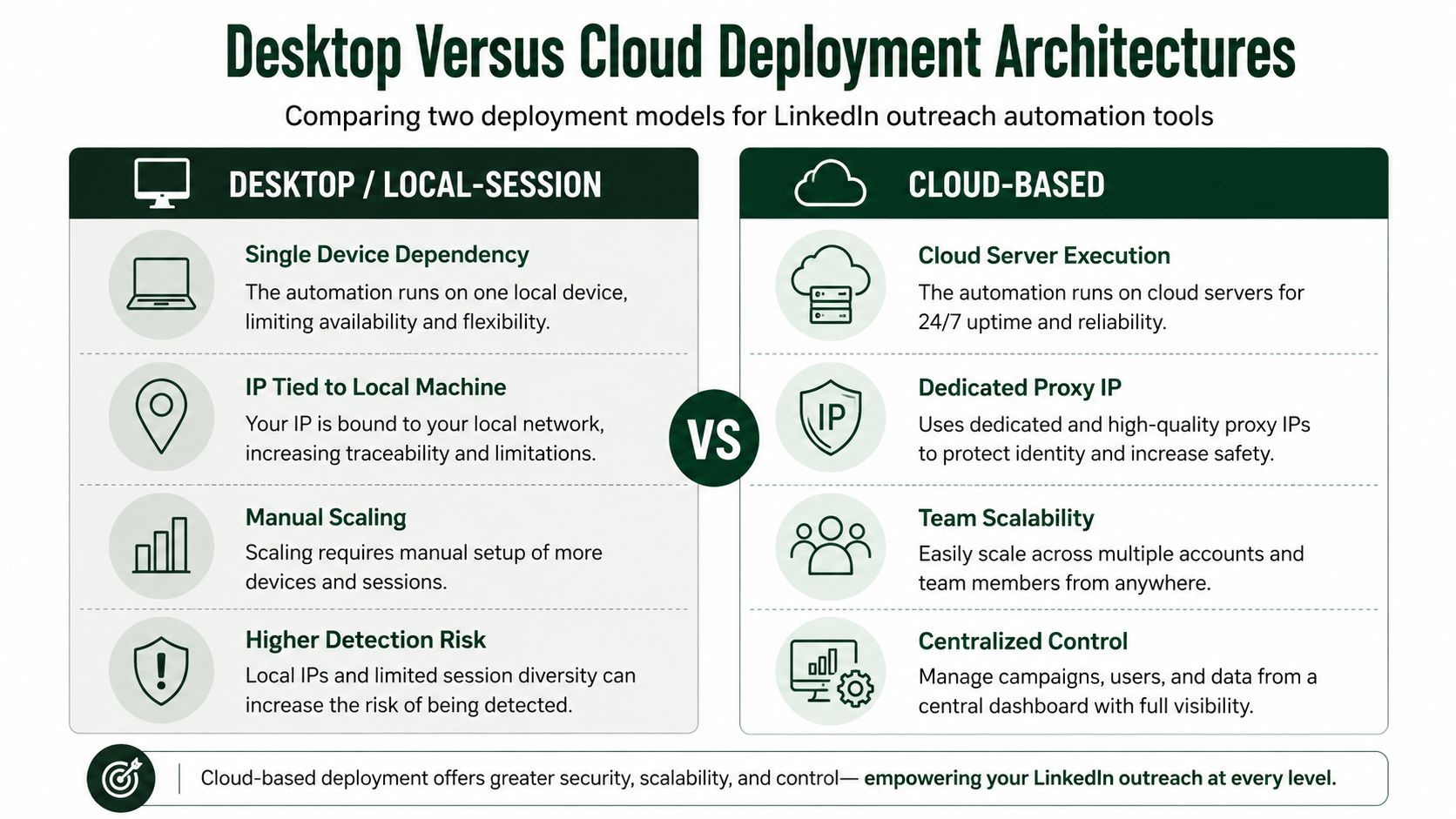
Operational differences
Dimension | Desktop/Local-Session | Cloud-Based |
|---|---|---|
Execution | Runs on a local device and session | Runs through remote infrastructure |
Continuity | Depends on the device and operator | Less dependent on a browser staying open |
Team access | Often tied to an individual workstation | Centralized dashboards and shared workflows |
Scaling | Requires more local setup and manual coordination | Better suited to distributed sender operations |
Control | More direct local control | More centralized vendor-managed control |
Cost profile | Usually lower entry cost | Higher cost reflects hosted infrastructure and team features |
Reviewed 2026 comparison data lists Linked Helper as a desktop application with local session handling, 11 native CRM integrations plus webhooks, and a starting price of $15 per month. The same comparison places cloud-first platforms such as Expandi, Dripify, HeyReach, Zopto, Salesrobot, and Skylead around safer multi-step outreach and team workflows, with typical pricing between $59 and $215 per month, depending on the vendor and feature set (2026 deployment comparison).
That price difference isn't just a feature tax. Cloud tools carry hosting, session management, account orchestration, team permissions, and monitoring costs. Desktop tools can be sensible for a solo operator who understands the local environment, but the operational burden rises quickly when several senders work across Singapore, Australia, India, Japan, and other APAC markets.
Selecting the architecture
Use local-session software when cost and granular control outweigh collaboration requirements, and when one accountable operator can maintain the environment. Choose cloud infrastructure when the campaign needs centralized oversight, multi-sender coordination, branching workflows, or continuity beyond one employee's machine.
Teams documenting their broader AI marketing infrastructure setup should record session ownership, access controls, CRM dependencies, pause procedures, and account recovery steps. Architecture isn't a technical footnote. It determines whether the outbound function remains usable when people, devices, and market schedules change.
Evaluating Leading Platforms for B2B Pipeline
A platform should be judged by how well it maintains pipeline state, not by how many actions it can queue. The working sequence is familiar: identify a prospect, send a connection request, follow up after acceptance, detect a reply, and route the conversation to a person or meeting process. The harder requirement is keeping those events aligned with CRM status, email activity, account ownership, and buying signals across distributed APAC teams.
Industry performance varies materially, from 4.2% to 10.5%, with HR and Talent professionals at 10.9% compared with C-level executives at 7.0%, according to the LinkedIn outreach benchmark. Those figures make broad reply-rate claims a weak basis for selection. Audience quality, message relevance, routing logic, and operator discipline can matter more than the sending interface.
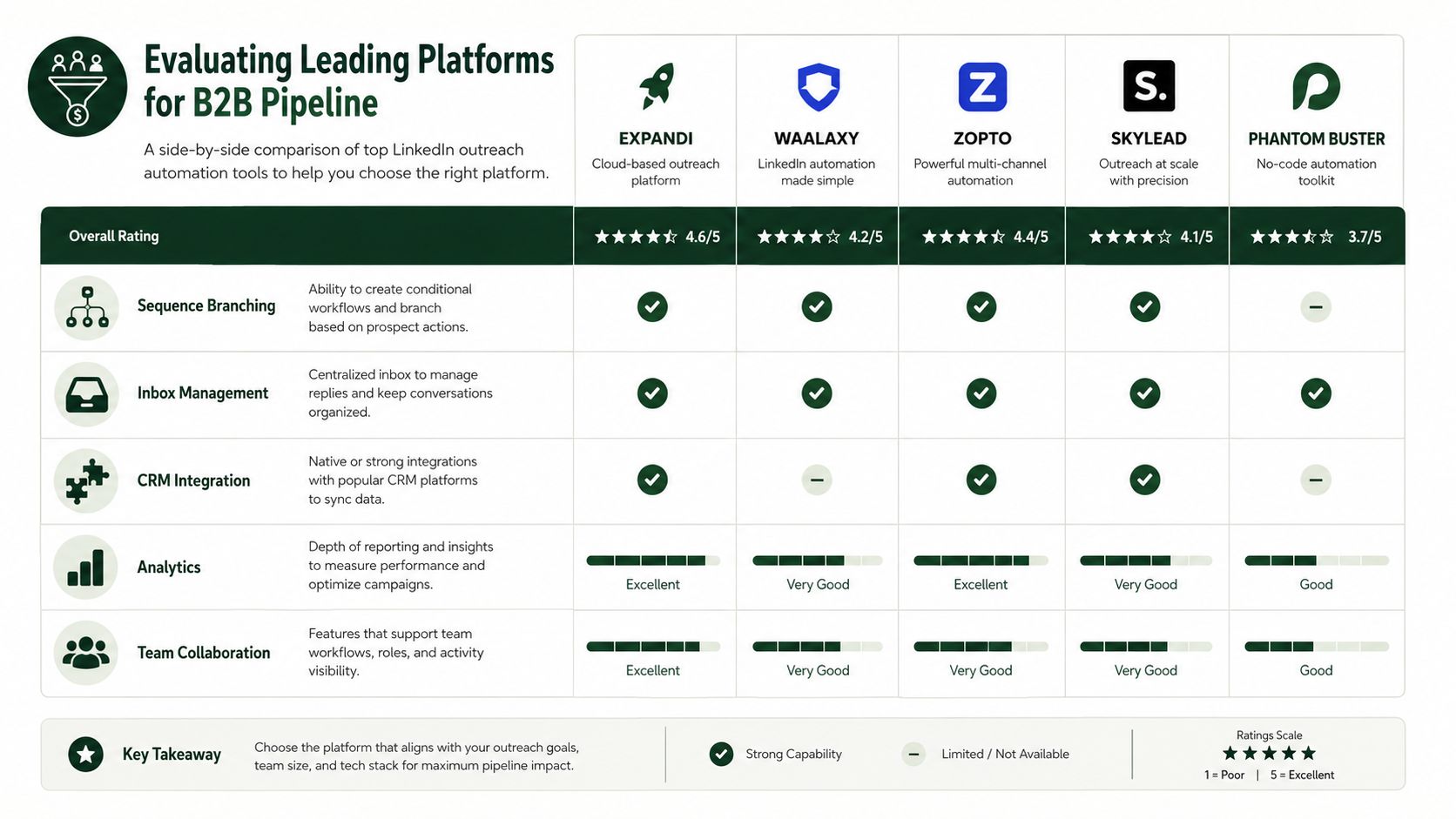
How the main platforms fit different operating models
HeyReach suits teams managing several sender accounts, shared campaigns, or agency-style operations. Its value depends on more than connection requests. Managers need to separate accounts, assign ownership, review replies, and coordinate activity without forcing every operator to maintain a disconnected process. Teams evaluating HeyReach for LinkedIn outreach should test account permissions, reply handling, and CRM handoffs with real campaign data before adding more senders.
Expandi fits teams seeking cloud execution, controlled multi-step campaigns, and a structured operating model. It works when sales managers need repeatable sequences across representatives and want LinkedIn and email actions evaluated together. More configuration also creates more room for poor audience logic, weak branching, and generic outreach at scale.
Dripify is suited to teams that value visual campaign building and reporting. Managers can inspect sequence performance and standardize follow-up execution across representatives. The platform cannot correct inaccurate targeting, weak positioning, or a profile that gives prospects no reason to continue the conversation.
Skylead makes sense when branching logic drives the workflow. An accepted connection, profile visit, email click, and reply may each require a different next action. The operational benefit comes from routing those signals correctly, not from adding more touches to a sequence.
Zopto is aimed at structured, Sales Navigator-led campaigns and teams prepared to operate a more managed platform environment. The decision should rest on whether the organization's targeting rules, approval process, and governance justify that overhead.
PhantomBuster occupies a different position. Its flexibility supports technical prospecting and chained workflows, while placing more implementation responsibility on the team. It suits operators assembling custom data and automation flows rather than teams seeking a tightly governed sales execution layer.
What to test before buying
Ask each vendor to demonstrate these scenarios using your own process:
Accepted connection: Can the system branch into a relevant follow-up without duplicating CRM activity?
Positive reply: Does the reply reach a shared inbox and create a clearly accountable owner?
No response: Can the sequence pause, change channel, or stop when a signal changes?
Multiple senders: Can managers isolate account activity, permissions, and reporting?
Restriction event: Can the team pause affected workflows without disrupting unrelated accounts?
The test should include handoffs, failure states, and ownership changes, not only a successful demo path. For teams that need LinkedIn activity to become usable CRM context, LinkedIn Capture for Microsoft 365 is a relevant resource to assess alongside the automation layer. The broader operating model is covered in this guide to lead generation automation tools. A platform earns its place through reliable state changes, controlled access, and recoverable workflows, not an impressive feature page.
Compliance and Account Risk Management
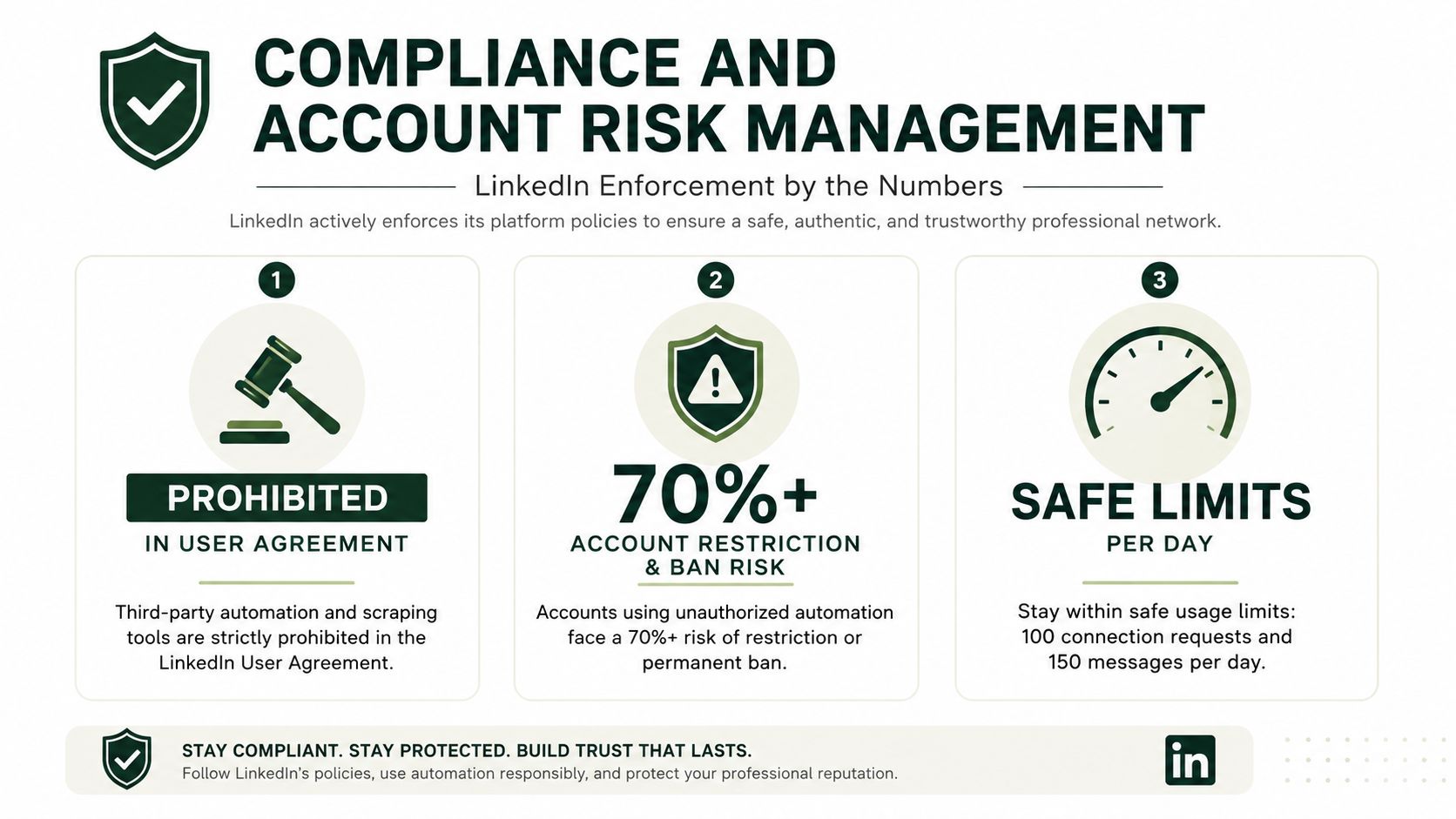
Compliance belongs in the architecture, not at the end of a vendor checklist. LinkedIn's Help Center states that third-party software and browser extensions that scrape, alter the appearance of, or automate activity on LinkedIn are not allowed. Restricted users are told to disable the software involved before the account can be automatically re-enabled at the stated suspension time (LinkedIn outreach limits and restrictions).
That rule changes how teams should assess automation. No vendor can promise account safety when the underlying activity conflicts with platform policy. Throttling, session controls, and account isolation can reduce exposure, but they do not convert prohibited activity into approved activity.
Recent 2026 policy-focused coverage reports restriction rates of 27% in a Q1 2026 cohort and as high as 41% in a May 2026 enforcement wave for some shared-proxy providers (LinkedIn automation compliance coverage). These figures are not a universal probability for every account. They do show why shared infrastructure, aggressive volume, and weak separation between senders require close review.
Build for failure before launch
A regional pipeline should continue operating if one sender is restricted. Give every account a clear owner, document the pause procedure, and keep active prospects and sequence state in the CRM. Isolate account activity, avoid shared credentials, and make it possible to stop one campaign without taking every market offline.
Practical safeguards include:
Conservative pacing: Independent 2026 guidance recommends human-like thresholds, including 20 to 30 connection requests per day and under roughly 100 connections per week (LinkedIn automation usage guidance).
Session consistency: Keep each sender's operating context stable instead of moving accounts unpredictably between devices, locations, or shared environments.
Human review: Route positive replies and nuanced objections to a person. Automation should not improvise commercial claims or manage sensitive conversations without oversight.
Recovery playbooks: Document how to pause sequences, notify owners, preserve CRM status, and restart only after the cause is understood.
For teams reporting social activity across channels, data mappings for social posts can clarify how operational events map to reporting and governance workflows. The goal is to limit blast radius, preserve evidence, and make responsible decisions before account continuity affects revenue.
An internal policy should specify which actions are automated, which require approval, what thresholds trigger a pause, and who owns an enforcement response. Teams can also use this LinkedIn outreach guide to document safer operating practices without treating conservative usage as compliance approval.
Integrating Automation into Signal-Driven Outbound Systems
LinkedIn automation works best as a response layer. It shouldn't decide whom to target solely because a person matches a title filter. The system should first establish account fit, identify a relevant signal, enrich the contact, and then choose whether LinkedIn is the right next touch.
Independent 2026 B2B outreach data places LinkedIn response rates at roughly 10%, about twice the 5% average for cold email, while Outreach's 2025 sales-cycle data says the majority of sales organizations face cycles stretching 90+ days (LinkedIn outreach and sales-cycle analysis). Higher response doesn't mean faster revenue. It means LinkedIn can be useful for contact creation and conversation opening while longer buying processes require disciplined multi-channel follow-up.
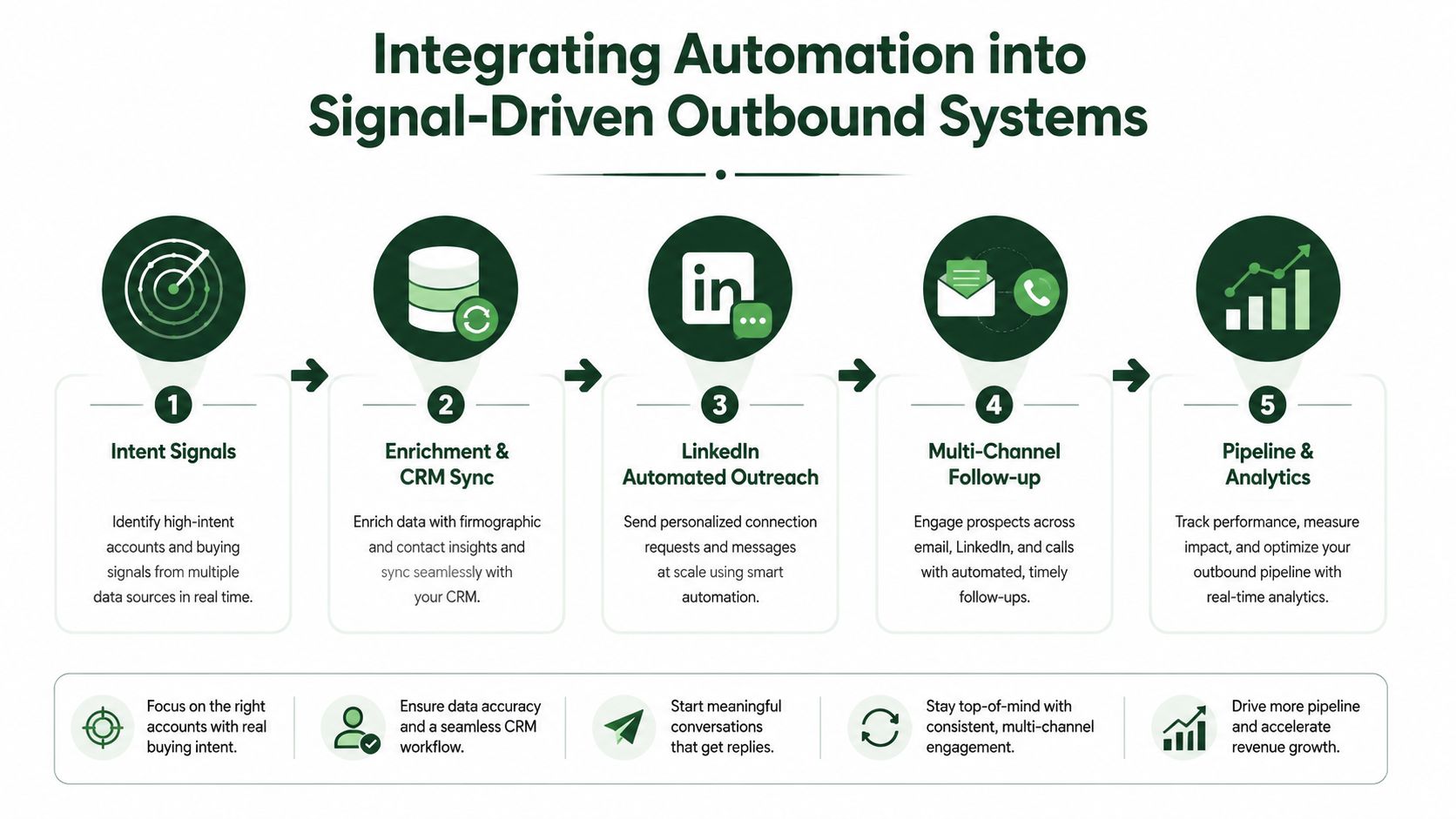
A practical system flow
Detect a signal. Use Trigify to identify relevant social engagement and Whitewhale to support intent-led routing. The signal should explain why outreach is timely, not merely confirm that a contact exists.
Enrich and validate. Use Apollo to improve contact context, verify role and company information, and reduce the risk of sending a message based on stale data.
Choose the first channel. LinkedIn may be the right opening touch when the signal is social or the prospect is active there. Email may be better when the message requires detail, a document, or a clearer operational explanation. Instantly can handle the email sequencing layer when email belongs in the route.
Branch on behavior. An accepted connection, a profile visit, an email interaction, a social engagement, and a direct reply should not all produce the same follow-up. The CRM should record the event and the automation layer should apply the appropriate next action.
Return response data. Positive replies, objections, no-response outcomes, and meetings should feed back into targeting and messaging. A campaign that only reports messages sent isn't measuring pipeline quality.
A proxy discussion may be relevant to data collection and research workflows, but it shouldn't be used to disguise prohibited LinkedIn automation. Teams evaluating proxy practices for data gathering should separate lawful research architecture from account activity and involve compliance owners before implementation.
The strategic role of LinkedIn depends on the account. For a warm social signal, it can lead. For a complex enterprise offer, it may be one touch among email, calls, content, and human follow-up. The right system doesn't force every prospect through the same channel. It routes attention where the evidence says the buyer is most reachable.
Situational Recommendations for Different Team Profiles
The right LinkedIn outreach automation tool depends less on a universal ranking than on the team's failure tolerance, operating maturity, and path to pipeline. A solo founder and an agency managing multiple client sender profiles shouldn't use the same architecture just because both want automated follow-up.
Solo founders
Start with the smallest system that creates learning. A local-session tool such as Linked Helper can suit a technically comfortable founder who wants direct control and low overhead. Keep the audience narrow, write the first sequence manually, and use a CRM rather than allowing prospect history to remain inside a tool.
The founder should personally review replies and objections. At this stage, the objective isn't maximum throughput. It's discovering which problem, segment, and message produce genuine conversations.
Venture-backed SaaS startups
A startup building outbound from zero needs a cloud-first workflow once several representatives or sender profiles become involved. HeyReach is a practical candidate for multi-sender orchestration, while Apollo can support enrichment and Instantly can manage email branches.
The stack should share one source of truth for account, contact, signal, owner, and next action. Don't let each SDR create an independent LinkedIn campaign with different definitions of a qualified prospect. Standardize the data model before adding more automation.
Mid-market teams expanding into APAC
Choose centralized cloud operations when sales activity spans multiple time zones and markets. Expandi, Dripify, HeyReach, or Skylead can be assessed according to the team's need for sequence branching, manager visibility, and cross-channel routing.
APAC expansion also requires local judgment. Segment by market rather than translating one sequence mechanically. Give regional owners authority to pause messaging that sounds culturally wrong, and keep account-level reporting visible to the central revenue team.
Agencies
Agencies need account isolation, role-based access, reporting, and clean client handoffs. HeyReach is a strong candidate to assess for multi-sender and agency workflows, while cloud deployment reduces dependence on individual staff browsers.
Don't mix clients inside one undifferentiated campaign. Each account needs its own targeting logic, approvals, sender ownership, restrictions procedure, and reporting view.
Revenue leaders rebuilding after churn
Prioritize continuity over sophistication. Use a documented cloud workflow, a CRM with clear ownership, and a human approval step for positive replies. The Social Search can support ICP definition, list building, messaging, LinkedIn and email sequencing, signal-driven routing, reporting, and enablement as an external GTM engineering function.
A lower-cost local setup may be appropriate for initial learning, but migrate when the team adds senders, markets, or handoffs. The trigger isn't vanity scale. It's the point at which one person's absence can stop pipeline creation.
Implementing Your LinkedIn Automation System
Treat the automation workflow as operating infrastructure. Prepare the account, data, controls, and ownership before building sequences. Confirm profile quality, CRM fields, target-market definitions, sender responsibility, and who can pause activity when conditions change.
Start with a focused, enriched list and separate messaging by buyer problem. Keep initial activity restrained, then review acceptance, replies, positive conversations, unusual login prompts, and account warnings. As noted earlier, stay within 20 to 30 connection requests per day and treat weekly volume as a controlled ceiling, not a target.
A practical first month:
Prepare accounts and data. Record sender ownership, segments, CRM fields, escalation contacts, and pause criteria.
Launch one controlled sequence. Use a specific connection reason and a follow-up that adds context before discussing a solution.
Review replies manually. Log objections, buying language, and disqualification reasons in the CRM.
Add the second channel carefully. Route suitable prospects to email or another human-led touch. Do not copy the same message across channels.
Create a handoff record. Store sequence logic, account status, message versions, and next actions so another operator can continue the workflow.
Keep account health visible beside pipeline metrics. More replies do not justify higher volume if warnings, login challenges, or inconsistent sessions appear. The system should be easy to pause, explain, audit, and restart without losing ownership of active conversations.
The Social Search designs and operates connected outbound systems for B2B teams selling into APAC and global markets, covering ICP definition, data, messaging, LinkedIn and email sequencing, signal-driven routing, reporting, and sales enablement. For a documented, measurable, transferable workflow, visit The Social Search to discuss a system build or embedded GTM support.
